
1.17 Program the Application
The project is now ready to be programmed onto the hardware board. Please refer to the hardware user’s guide for the various programming options available.
The SAM E54 Curiosity Ultra Development Board [4] can be programmed using the on-board Embedded Debugger (EDBG).
- Connect a Micro-USB cable from your computer to the DEBUG USB port on the SAM E54 Curiosity Ultra Development Board.
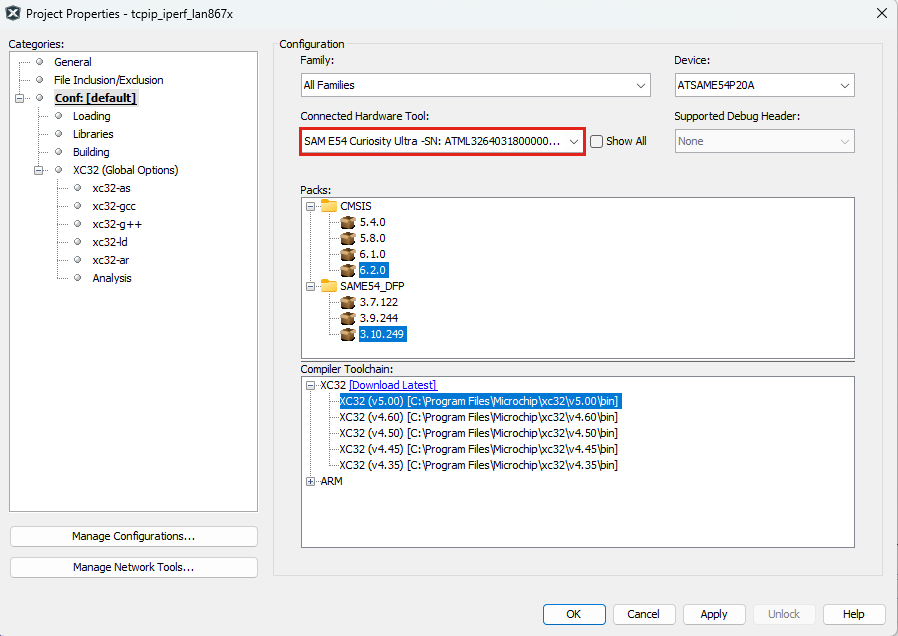
- Open the “Project Properties”.
- In the “Connected Hardware Tool” section, select “SAM E54 Curiosity Ultra”.
- Click OK.
- Program the application by clicking
the Make and Program Device Main Project button (see below).

- Ensure the programming was successful.
- Repeat steps 1 to 6 to program the
application on the second node.Important: For the second node, choose a different Node Id, IP Address and MAC Address.