
1.4.2 Data Storage Client
The Data Storage Client enables you to create a partition in the Flash Memory System and specify the memory content for that partition. You can access the partition directly via the Flash Memory System busses. The Add Data Storage Client dialog box opens with blank fields; the Modify Data Storage Client displays any values you have already set.
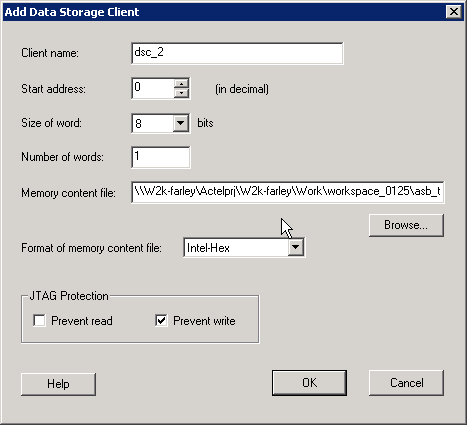
The description of the fields in the Add Data Storage Client dialog box are as follows:
- Client Name - Name of the client; the value you enter is attached before the select and enable names to group all the control signals for that client.
- Start Address (in decimal) - Sets the starting address for the Data Storage Client.
- Size of Word - Word size, in bits, of the initialized client; can be either 8, 16 or 32.
- Number of Words - Can be anywhere from 1-262144 for 8 bit words, 1–131072 for 16-bit words, and 1-65536 for 32-bit words.
- Memory Content files - The content for the Flash Memory Block to initialize this client. Must be specified in one of the supported memory formats.
- Format of memory content file - Set your memory file format for the Flash Memory System Builder.
- JTAG Protection - Protect your JTAG from read and write with these options.