
1.4.4 Initialization Client
The Flash Memory System Builder initializes all the clients with the data stored in the Flash Memory when the system is powered-up. You must assert the INIT_POWER_UP signal to 'High' to power up the system. You can use the Initialization Client to set initial values of the RAM/FIFO (such as a table or list of filter coefficients, MAC addresses, etc.) and ROM emulation.
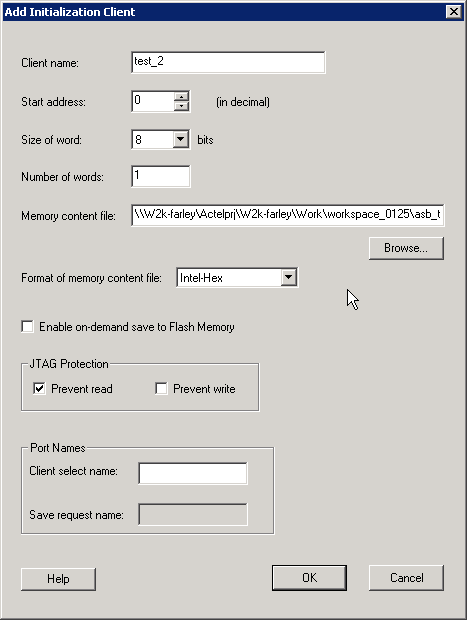
The description of the fields in the Add Initialization Client dialog box are as follows:
- Client Name - Name of the client; the value you enter is attached before the select and enable names to group all the control signals for that client.
- Start address - Starting address for the initialization client.
- Size of word- The word size in bits (8 or 9) of the initialized client. With a 9-bit word size, each word takes 2 bytes of Flash Memory System data.
- Number of Words - May be anywhere from 1-262144 for 8-bit words or 1-131072 for 9-bit words.
- Format of memory content file - The content for the Flash Memory System Builder to initialize this client; specified in one of the supported memory formats.
- Enable on demand save to Flash Memory- Enables the content of Flash Memory System to be stored in the Flash Memory. For timing diagrams and signals operations, refer to Save data to FMS in the SmartGen Cores Reference Guide.
- JTAG Protection - Protect your JTAG from read and write with these options.
- Client Select and Save Request port names - Port names for the client chip select for initialization and save request for save-back. The port names are prefixed with the client name to group control signals.