
17.7.3 Analog System Builder Macro
Analog System Builder
Analog System Builder is available across the Fusion device family.
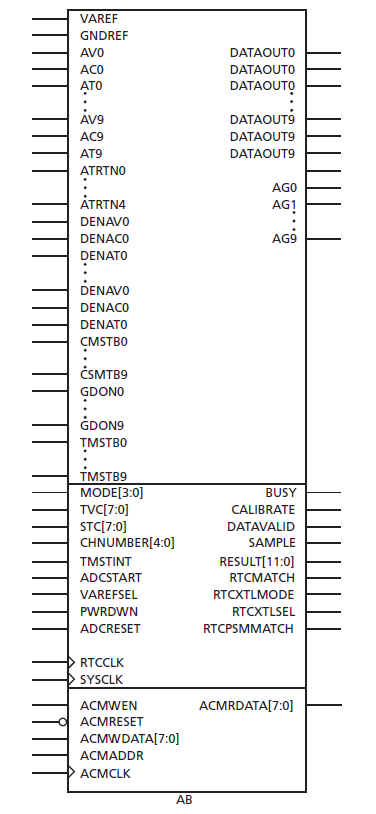
- Function: Analog system builder for use Fusion. See the Fusion datasheet for a thorough description of the Analog System Builder.
- Inputs/Outputs: Inputs are listed on the left, outputs on the right. See the following description for an explanation of the inputs and outputs available on the Analog System Builder. For a complete description of the features in the ASB, see the Fusion datasheet.
Analog System Builder Pin Description
| Signal Name | Number of bits | Direction | Function |
|---|---|---|---|
| VAREF | 1 | Inout | External voltage ref.; used as either input or output, depending on VREFSEL |
| GNDREF | 1 | Input | External ground ref. |
| MODE[3:0] | 4 | Input | ADC operating mode |
| SYSCLK | 1 | Input | External system clock |
| TVC[7:0] | 8 | Input | Clock divide control |
| STC[7:0] | 8 | Input | Sample time control |
| CHNUMBER[4:0] | 5 | Input | Analog input channel select |
| ADCSTART | 1 | Input | Start of conversion |
| PWRDWN | 1 | Input | Comparator power-down if 1 |
| ADCRESET | 1 | Input | ADC initialize if 1 |
| BUSY | 1 | Output | 1 – Running conversion |
| CALIBRATE | 1 | Output | 1 – Power-up calibration |
| DATAVALID | 1 | Output | 1 – Valid conversion result |
| RESULT[11:0] | 12 | Output | Conversion result - MSB justified |
| TMSTBINT | 1 | Input | Internal temp. monitor strobe |
| SAMPLE | 1 | Output | 1 – Analog input is sampled |
| CMSTB0 to CMSTB9 | 10 | Input | Current monitor strobe – 1 per quad, active high |
| GDON0 to GDON9 | 10 | Input | Control to power MOS – 1 per quad |
| TMSTB0 to TMSTB9 | 10 | Input | Temperature monitor strobe – 1 per quad; active high |
| DAVOUT0, DACOUT0, DATOUT0 to DAVOUT9, DACOUT9, DATOUT9 | 30 | Output | Digital outputs – 3 per quad |
| DENAV0, DENAC0, DENAT0 to DENAV9, DENAC9, DENAT9 | 30 | Input | Digital input enables – 3 per quad |
| ACMCLK | 1 | Input | ACM clock |
| ACMWEN | 1 | Input | ACM write enable – active high |
| ACMRESET | 1 | Input | ACM reset – active low |
| ACMWDATA[7:0] | 8 | Input | ACM write data |
| ACMRDATA[7:0] | 8 | Output | ACM read data |
| ACMADDR[7:0] | 8 | Input | ACM address |
| VAREFSEL | 1 | Input | 0 = Output internal voltage reference (2.56 V) to VAREF 1 = Input external voltage reference from VAREF and GNDREF |
| AV0 | 1 | Input | Analog Quad 0 |
| Signal Name | Number of bits | Direction | Function |
|---|---|---|---|
| AC0 | 1 | Input | — |
| AG0 | 1 | Output | — |
| AT0 | 1 | Input | — |
| ATRTN0 | 1 | Input | Temperature monitor return shared by Analog Quads 0 and 1 |
| AV1 | 1 | Input | Analog Quad 1 |
| AC1 | 1 | Input | — |
| AG1 | 1 | Output | — |
| AT1 | 1 | Input | — |
| AV2 | 1 | Input | Analog Quad 2 |
| AC2 | 1 | Input | — |
| AG2 | 1 | Output | — |
| AT2 | 1 | Input | — |
| ATRTN1 | 1 | Input | Temperature monitor return shared by Analog Quads 2 and 3 |
| AV3 | 1 | Input | Analog Quad 3 |
| AC3 | 1 | Input | — |
| AG3 | 1 | Output | — |
| AT3 | 1 | Input | — |
| AV4 | 1 | Input | Analog Quad 4 |
| AC4 | 1 | Input | — |
| AG4 | 1 | Output | — |
| AT4 | 1 | Input | — |
| ATRTN2 | 1 | Input | Temperature monitor return shared by Analog Quads 4 and 5 |
| AV5 | 1 | Input | Analog Quad 5 |
| AC5 | 1 | Input | — |
| AG5 | 1 | Output | — |
| AT5 | 1 | Input | — |
| AV6 | 1 | Input | Analog Quad 6 |
| AC6 | 1 | Input | — |
| AG6 | 1 | Output | — |
| AT6 | 1 | Input | — |
| ATRTN3 | 1 | Input | Temperature monitor return shared by Analog Quads 6 and 7 |
| AV7 | 1 | Input | Analog Quad 7 |
| AC7 | 1 | Input | — |
| AG7 | 1 | Output | — |
| Signal Name | Number of bits | Direction | Function |
|---|---|---|---|
| AT7 | 1 | Input | — |
| AV8 | 1 | Input | Analog Quad 8 |
| AC8 | 1 | Input | — |
| AG8 | 1 | Output | — |
| AT8 | 1 | Input | — |
| ATRTN4 | 1 | Input | Temperature monitor return shared by Analog Quads 8 and 9 |
| AV9 | 1 | Input | Analog Quad 9 |
| AC9 | 1 | Input | — |
| AG9 | 1 | Output | — |
| AT9 | 1 | Input | — |
| RTCMATCH | 1 | Output | MATCH |
| RTCPSMMATCH | 1 | Output | MATCH connected to VRPSM |
| RTCXTLMODE[1:0] | 2 | Output | Drives XTLOSC RTCMODE[1:0] pins |
| RTCXTLSEL | 1 | Output | Drives XTLOSC MODESEL pin |
| RTCCLK | 1 | Input | RTC clock input |
Connecting Analog Ports
Each analog port must be connected to one of the following “virtual pads”: INBUF_A. INBUF_DA or OUTBUF_A. AV0, AC0, AT0, …, AV9, AC9 and AT9 are analog inputs that can be used either as analog or digital inputs. When used as an analog input, the analog input signal (e.g. AV0) must be connected to an INBUF_A, and the corresponding digital input enable (e.g. DENAV0) must be tied to 0.
When used as a digital input, the analog input must be connected to an INBUF_DA, and the corresponding digital input enable must be tied to 1.
All other analog inputs (ATRETURN01, ATRETURN23, ATRETURN45, ATRETURN67 and ATRETURN89) must be connected to an INBUF_A.
Analog outputs (AG0, …, AG9) must be connected to an OUTBUF_A instance.
VAREF is an inout pad and does not need to be connected to INBUF_A or OUTBUF_A.
Serialization
The analog ports are represented by a 1-bit wide port in both the Verilog and VHDL simulation models. Verilog modules and VHDL functions were developed to drive a real value through a 1-bit port and to read an analog value from a 1-bit port. The Analog System Builder macro contains embedded read and drive logic to read from the analog input and drive the analog output, respectively.
The drive module/function converts a real value into a 64-bit value, serializes it and streams it in zero simulation time, using delta delays. The read module/function deserializes a 64-bit stream into a 64-bit value and converts it into a real value.
Connecting Analog Ports with Verilog
Two Verilog modules (drive_analog_io and read_analog_io) are available to drive an analog input and read an analog output. You must instantiate a drive_analog_io for each analog input and a read_analog_io for each analog output. The read_analog_io starts as soon as there is a non 'Z' data bit on the module input pin. All read and drive operations happen in zero time (delta delays). drive_analog_input is a new module with the same functionality as drive_analog_io and can be used interchangeably to drive analog inputs.
Example: drive_analog_io with an INBUF_A and OUTBUF_A instantiation
wire AV0_stream_pad, AV0_stream_y, AG0_d, AG0_pad;
wire [63:0] AG0_VECTOR;
real AV0_real;
drive_analog_io drive_AV0 ( $realtobits(AV0_real), AV0_stream_pad );
INBUF_A inbuf_AV0 ( .Y(AV0_stream_y), .PAD (AV0_stream_pad) );

AB ab_inst (
    …
    .AV0 (AV0_stream_y),
    …
    .AG0 (AG0_d),
    …
    );
OUTBUF_A outbuf_AG0 ( .PAD(AG0_pad), . D (AG0_d) );
initial
begin
AV0_real <= 1.28;
end
Connecting Analog Ports with VHDL
Similarly, two VHDL functions (drive_analog_input and read_analog_input) are available to drive an analog input and read an analog output. These functions are part of the analog_io VHDL package. The read_analog_input starts as soon as there is a non 'Z' data bit on the function input pin. All read and drive operations happen in zero time (delta delays).
Example: drive_analog_input and read_analog_input with an INBUF_A instantiation
use work.analog_io.all;
…
signal varef_real : real
signal AV0_real : real
signal varef_serial_out : std_logic;
signal AV0_stream_pad : std_logic;
signal AV0_stream_y : std_logic;
component INBUF_A
  port(
  …
  );
end component;
component AB
  port(
  …
  );
end component;
read_varef : process
begin
  wait until varef_serial_out /= 'Z';
  read_analog_input( varef_serial_out, varef_real);
end process read_varef;
-- concurrent procedural call
drive_analog_input( AV0_real, AV0_stream_pad );
drive_quads : process
begin
  AV0_real <= 2.18;
end process drive_quads;
-- INBUF_A instance
inbuf_at0 : INBUF_A
port map (
  PAD => AV0_stream_pad,
  Y => AV0_stream_y,
  …
);
-- AB instance
ab_inst: AB
port map (
  VAREF => varef_serial_out,
  …
  AV0 => AV0_stream_y,
  …
);
drive_temperature_quad and drive_current_monitor
In addition to the standard Verilog drive_analog_io modules and VHDL drive_analog_input procedures used to drive the analog quads, two Verilog modules and VHDL procedures are also available to drive the AC and AT quads.
The first Verilog module / VHDL procedure, drive_temperature_quad, takes a temperature in Celsius, converts it into a voltage, and drives it over the digital input. This can be used regardless of which input is selected by the Analog MUX - T-prescaler, temperature monitor or T-direct analog input. The equation is:
AT(V) = (Temperature(C) + 273.15 ) * ( 2.30258 * 0.000087248)
The second Verilog module / VHDL procedure, drive_current_monitor, can only be used when driving an AC quad that are used for Current Monitoring. As an input it takes the corresponding AV quad voltage (e.g. AV3's voltage, if driving AC3), the Resistor (in Ohm) and Current (in A) values, to calculate the voltage on the AC quad (see the Fusion datasheet for more information). The resistor must be between the 0.01 and 10 Ohm, and (AV - AC) has to be less than 250 mV. The equation is:
AC(V) = AV(V) - (Resistor(Ohm) * Current(A) )
If the analog MUX selects the C-prescaler or the C-direct input, then use the standard VHDL procedure drive_analog_input or Verilog drive_analog_io modules to drive the AC quad.
- drive_temperature_quad and drive_current_monitor Verilog Example
real voltage0, resistor0, current0, temperature0;
wire AV0_i, AC0_i, AT0_i;
wire AV0_o, AC0_o, AT0_o;

drive_analog_io drive_AV0 ( $realtobits(voltage0), AV0_i );
drive_current_monitor drive_CM_AC0 ( $realtobits(voltage0), $realtobits(resistor0),
$realtobits(current0), AC0_ i );
drive_temperature_quad drive_AT0 ( $realtobits(temperature0), AT0_ i );

INBUF_A inbuf_a_voltage0 ( .Y(AV0_o), .PAD (AV0_i) );
INBUF_A inbuf_a_current0 ( .Y(AC0_ o), .PAD (AC0_ i) );
INBUF_A inbuf_a_temperature0 ( .Y(AT0_ o), .PAD (AT0_ i) );

AB ab_inst (
…
.AV0 (AV0_ o),
.AC0 (AC0_ o),
.AT0 (AT0_ o),
…
);

initial
begin
    voltage0 <= 1.00032;
    resistor0 <= 1.0;
    current0 <= 1.031;
    temperature0 <= -70.0;
  …
  End
- drive_temperature_quad and drive_current_monitor VHDL Example
component INBUF_A
port(
PAD : in STD_ULOGIC;
Y : out STD_ULOGIC);
end component;
component AB
port(
VAREF : INOUT STD_LOGIC ;
GNDREF : IN STD_LOGIC ;
AV0 : IN STD_LOGIC ;
…
RTCMATCH : OUT STD_LOGIC ;
ACMRDATA : OUT STD_LOGIC_VECTOR(7 DOWNTO 0)
) ;
end component;
signal voltage0_pad, current0_pad, temperature0_pad, voltage0_y, current0_y, temperature0_y, : std_logic;
signal voltage0, current0, resistor0, temperature0 : real;

-- concurrent procedure calls for driving voltage0_pad, current0_pad, temperature0_pad drive_analog_input( voltage0, voltage0_pad );
drive_current_monitor ( voltage0, resistor0, current0, current0_pad );
drive_temperature_quad(temperature0, temperature0_pad );
drive_aq : process begin
voltage0 <= 1.00032;
resistor0 <= 1.0;
current0 <= 1.031;
temperature0 <= -70.0;
…
end process drive_aq;
inbuf_a_voltage0 : INBUF_A
port map (
PAD => voltage0_pad,
Y => voltage0_y
);

inbuf_a_current0 : INBUF_A
port map (
PAD => current0_pad,
Y => current0_y
);

inbuf_a_temperature0 : INBUF_A port map (
PAD => ato_pad,
Y => temperature0_y
);

top: AB
port map (
…
AV0 => voltage0_y,
AC0 => current0_y,
AT0 => temperature0_y,
…
);
drive_current_inputs
This module/procedure has been added to both Verilog and VHDL libraries to drive both the pads of an AV/AC pair when configured as a current monitor. Voltage for AV, resistor and current are the inputs, serialized AV and AC are the outputs. You can use this module/procedure to replace a pair of drive_analog_input and drive_current_monitor instances, as shown in the following example.
- drive_current_inputs Verilog Example
- Two drivers for driving inputs to voltage and current pads:
- drive_current_inputs VHDL Example
- Two drivers for driving inputs to voltage and current pads:
drive_differential_inputs
This module/procedure has been added to both Verilog and VHDL libraries to drive both the pads of an AV/AC pair when configured for differential inputs. Voltage for AV, AV-AC delta are the inputs, serialized AV and AC are the outputs.
drive_varef_out
Use this module to drive external VAREF onto VAREF inout pin. Since the applied voltage is serialized, you must ensure that the receiving logic in AB model is ready to receive the serial stream. Microchip® recommends that you wait until the RESET signal is deasserted (inactive) before assigning the external voltage to VAREF. This module is available in Verilog only. Use drive_analog_input in VHDL to drive external VAREF.
For example, driving VAREF externally by instantiating drive_varef_out module/procedure:
- drive_varef_out Verilog Example
drive_varef_out i_VAREF ( .parallel_in($realtobits(val_varef)), .en_out(!SYS_RESET), .serial_out(VAREF) ); initial begin wait(!SYS_RESET); val_varef = 3.00; end- drive_varef_out VHDL example
…
    use work.analog_io.all;
    …
    signal varef_real : real signal VAREF : std_logic;
component AB
    port(
    …
    );
-- concurrent procedure call
drive_analog_input( varef_real, varef_pad );

drive_quads : process
    begin
        wait until ( SYS_RESET = '1' ); -- active low reset
        varef_real <= 3.00;
        ...
        end process drive_quads;
    ab_inst: AB
        port map (
        VAREF => varef_pad,
        …
        …
        );
drive_analog_input
A new module with the same functionality as drive_analog_io has been added to Verilog library (for naming consistency with VHDL).
The following table lists procedures/modules available for driving specific Analog System Builder analog input pins in both Verilog and VHDL libraries.
| Analog input procedure-module | AV0…AV9 | AC0…AC9 | AT0…AT9 | AV/AC pair | GNDREF | VAREF |
|---|---|---|---|---|---|---|
| drive_analog_input | X | X | X | — | X | X |
| drive_analog_io (Verilog only) | X | X | X | — | X | X |
| drive_temperature_quad | — | — | X | — | — | — |
| drive_current_inputs | — | — | — | X | — | — |
| drive_differential_inputs | — | — | — | X | — | — |
| drive_current_monitor | — | X | — | — | — | — |
| drive_varef_out (Verilog only) | — | — | — | — | — | X |
Each of the AV, AC and AT pins may be independently configured to be used as a digital input. An AV/AC pair refers to the AV and AC associated with a specific quad. When used as a pair these inputs are both driven from one function/module. For example:
- AV0 and AC0 can both be driven using drive_current_monitor
- AV9 and AC9 can both be driven using drive_differential_voltage
ENTITY testbench IS
END testbench;
Architecture stimuli of testbench is
...
begin
...
drive_analog_input ( real(AV0_real), AV0_serial );
...
serial_AV0 : process
begin
    wait until ( INIT_DONE = '1' );
    AV0_real <= 1.2;
    …
    …
end process serial_AV0;
Polarity
Each quad has a polarity bit, Bx[6], (e.g. B0[6] for AV0-polarity and B4[6] for AV1-polarity). The default polarity is Positive, Bx[6] = '0'. Polarity error occurs when the polarity bit is inconsistent with the quad sign (e.g. AV0 > 0 and AV0-polarity = '1').
AT-quad can only be positive and therefore its polarity can only be set to Positive, Bx[6] = '0'. For AT-quad, polarity error occurs if AT is negative or if AT-polarity is set to Negative, Bx[6] = '1'.
Prescaler
Each quad has a Prescaler Opamp mode bit, Bx[7], (e.g. B0[7] for AV0- prescaler op-amp and B4[7] for AV1 prescaler op-amp). Default is Powerdown, Bx[7] = '0'.
If the factor of the prescaler input and scaling factor is greater than the internal reference voltage, the prescaler output saturates and the prescaler output is equal to the internal reference voltage (default 2.56V).
If a Polarity error occurs (e.g. AV0 > 0 and AV0-polarity = '1'), the prescaler output is be '0.0'.
Current Monitor
Each C-quad has a Current Monitor Switch bit (B0[4] for AC0, B4[4] for AC1, etc.). This switch needs to be 'ON' if the analog MUX selects the Current Monitor, otherwise the analog MUX output is '0.0'. Default is Off, B0[4] = '0'.
The current monitor output is the difference between the AV and AC multiplied by a factor of 10. CMSTB-9 enables the current monitor for analog quads 0-9. Additionally, each C-quad has a Current-Monitor Switch (B0[4]) which enables you to switch the current monitor on or off. This switch needs to be 'ON' if the analog MUX selects the Current Monitor input, otherwise the analog MUX output will be '0.0'. The default setting is off.
The following requirements must be met in order to use the current monitor:
- ABS(AV) needs to be greater than ABS(AC), otherwise the Current Monitor returns a value of 0.0
- AV and AC must have the same sign and polarity. If not, they are invalid Current monitor inputs, and the current monitor output is 0.0
- If a Polarity error occurs (e.g. AV0 > 0 and AV0-polarity = '1', or AC0 < 0 and AC0-polarity = '0'), the current monitor output is 0.0
- If the difference between the AV and AC multiplied by a factor of 10 is greater than the internal reference voltage, the current monitor output saturates and the current monitor output is equal to the internal reference voltage (default 2.56V ).
Temperature Monitor
The temperature monitor output is the AT-quad value multiplied by a factor of 12.5. TMSTB0-9 enables the temperature monitor for analog quads 0-9.
AT quad only accepts positive voltages, and T-pad polarity has to be set to 0 (Positive)
If the AT-quad value multiplied by 12.5 is greater than the internal reference voltage, the temperature monitor output saturates and the temperature monitor output is equal to the internal reference voltage (default 2.56V).
When using the temperature monitor, to reflect a temperature change, the value applied to AT should be a differential voltage.
AT (delta V) = T (K) * (0.0595 / 300)
AT (delta V) = T (K) * 1.983E-4
- Using ADC in the Temperature Monitor
- Using the previous equation, 300K (room temperature) should correspond to 59.5mV (0.0595 on AT, therefore 0.748 at the temperature monitor output / ADC input). When doing a 10-bit ADC conversion using a 2.56V reference voltage, 0.0595 on AT (T=300K) gives a RESULT of 300 (decimal). In this case, 1LSB change on RESULT corresponds to 1K temperature change.
Direct Analog Input
Each V, C and T-quad has a Direct Analog Input Switch (B0[5] for AV0, B1[5] for AC0 and B3[5] for AT0) which enables you to switch the direct analog input ON or OFF. This switch must be ON if the analog MUX selects the direct analog input, otherwise the analog MUX output is 0.0. The default setting is OFF.
Analog Quad Switch Conditions
For the V-quad, the analog MUX can choose the V-prescaler or the V-direct analog input; for the C-quads, the analog MUX can select the C-prescaler, C-direct analog input or current monitor; for the T-quads, the analog MUX can choose the T-prescaler, the T-direct analog input or the Temperature Monitor.
Set the V, C and T-prescaler Opamp, V, C and T-direct analog input switches and Current Monitor switch need be set according to the following table for power efficiency and/or ADC conversion accuracy.
| Selected MUXinput Switch \ | V-Prescaler | V-Direct analog input | C-Prescaler | C-Direct analog input | Current Monitor | T-Prescaler | T-Direct analog input | Temp. Monitor |
|---|---|---|---|---|---|---|---|---|
| V-Prescale Op Amp | ON | OFF | X | X | X | X | X | X |
| V-Direct analog input switch | OFF | ON | X | X | "OFF" or"ON and 0<AV<var ef" | X | X | X |
| C-Prescale Op-Amp | X | X | ON | OFF | OFF | X | X | X |
| C-Direct analog input switch | X | X | OFF | ON | OFF | X | X | X |
| Current Monitor switch | X | X | OFF | OFF | ON | X | X | X |
| T-Prescaler Op-Amp | X | X | X | X | X | ON | OFF | OFF |
| T-Direct input switch | X | X | X | X | X | OFF | ON | OFF |
If you do not meet the switch conditions in the Table 17-209table, the analog MUX output is 0.0 and an error message appears.
In addition, when you the AV direct analog input, the scaling factor for the V-prescaler (B0[2-0]) must be 000 to avoid accidental damage if high voltages are applied.
The same restriction applies when you select the AC direct input; the scaling factor for the C-prescaler (B1[2-0]) must be 000. This restriction does not apply to the AT direct analog input.
When you do not use an analog input quad as an analog input or a digital input, it must tied to GND (1’b0 in Verilog and ‘0’ in VHDL). The corresponding configuration byte must be set to “00000000”.
ADC
The power-up calibration time after ADC comes out of reset is 3840 ADC_CLK cycles.
The conversion time can vary greatly depending on the SYSCLK frequency, ADCCLK frequency (determined by TVC), the STC settings, and the conversion bit-resolution (MODE).
t_conv = t_sync_read + t_sample + t_distrib + t_post_cal + t_sync_write
t_conv = SYSCLK period + ((2 + STC) * ADCCLK period) + (8, 10 or 12 * ADCCLK period) + (2 * ADCCLK period) + SYSCLK period
t_sync_read: Time for latching the input data
t_sample: Time for sampling the analog signal
t_distrib: Time for charge distribution
t_post_cal: Time for post-calibration
t_sync_write: Time for latching the output data
A Verilog parameter / VHDL generic enables faster conversion time.
RTC
When you use the RTC, you must first write the CTRL_STAT register. Refer to the Fusion datasheet for more information on the functionality of each CTRL_STAT register’s bit. If do not use the RTC, Microchip® recommends that you write the CTRL_STAT register to “00000000”.
When doing a byte-read from the counter, the match register, or the individual match bits, byte 0 must be read before other bytes can be read. A byte 0 read latches the 5-byte register into a 40-bit capture register. The following read operations are made from the 40-bit capture register. For the counter, the match register or the individual match bits, if bytes 1 through 4 are read before byte 0 is read, the read data (ACMRDATA) is irrelevant.
Example: Proper read sequence
Read COUNTER0
Read COUNTER4
Read COUNTER3
Read MATCHREG0
Read MATCHREG2
Read MATCHBITS0
Read MATCHBITS2
Read MATCHBITS3- Register Read and Write Conditions
- Use ACMADDR, ACWEN and ACMCLK (and ACMWDATA for write) to control RTC read and write operations. Besides setting those control signals properly, the following conditions need to be met before the read or write on the chosen register byte can be executed.
User Parameter / Generics
- MEMORYFILE
- This feature enables loading of the memory initial values. This can especially help with the AQ-ACM and RTC configurations. In Verilog the MEMORY is defined as an array of 8 bits by 90, and the memory init file format needs to be of a similar type. In VHDL, the MEMORY is defined as a 720-bit vector, and the memory init file needs to be of a similar type. Default is an empty string (i.e. no memory init file).
- WARNING_MSGS_ON
- This feature enables you to disable the warning messages display. Default is ON ('True' in VHDL and '1' in Verilog).
- FAST_ADC_CONV_SIM
- Setting FAST_ADC_CONV_SIM to True enables much faster ADC conversion time; In this fast simulation mode, the time for latching input and output data (one SYSCLK period each), and the time for sampling the analog input signal ((2 + STC) * ADCCLK period) are not accounted for. The default is OFF ('False' in VHDL and '0' in Verilog). Set FAST_ADC_CONV_SIM to 'True' in VHDL and to '1' in Verilog to enable this fast simulation mode.