
17.7.6 Clocking Resources
PLL for ProASIC®3 / IGLOO®
The static PLL supports only a single input. The Combiner is able to combine the PLL with the regular CLKBUF macros and any of the CCC macros to utilize available unused globals.
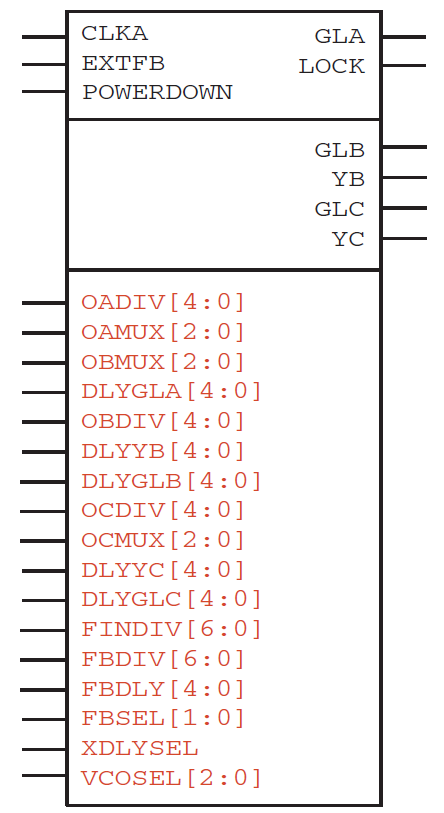
- Function: Static PLL
- Inputs/Outputs: See the following description for an explanation of the inputs and outputs available on the Static PLL for ProASIC3/E; all inputs are shown on the left, and outputs are to the right.
PLL for ProASIC3 / IGLOO is available across the IGLOO®, ProASIC3 device families.
Microchip® recommends that you use SmartGen to generate your PLLs; SmartGen calculates the settings for all the pins in the PLL for the required input-output frequency combinations.
Refer to the latest Microchip datasheets on PLLs for ProASIC3 / ProASIC3E for more information. They are available at Microchip's website.
In the Figure 17-216 figure, all the required user-accessible inputs and outputs are above the top horizontal line. Optional inputs and outputs are the top line. The static configuration inputs are below the second line. These pins can only be connected to GND or VCC.
The following table summarizes the configuration control bits.
| NAME | FUNCTION |
|---|---|
| FINDIV<6:0> | 7-BIT INPUT DIVIDER (/N) |
| FBDIV<6:0> | 7-BIT FEEDBACK DIVIDER (/M) |
| OADIV<4:0> | 5-BIT OUTPUT DIVIDER (/U) |
| OBDIV<4:0> | 5-BIT OUTPUT DIVIDER (/V) |
| OCDIV<4:0> | 5-BIT OUTPUT DIVIDER (/W) |
| OAMUX<2:0> | 3-BIT POST-PLL MUXA (BEFORE DIVIDER /U) |
| OBMUX<2:0> | 3-BIT POST-PLL MUXB (BEFORE DIVIDER /V) |
| OCMUX<2:0> | 3-BIT POST-PLL MUXC (BEFORE DIVIDER /W) |
| FBSEL<1:0> | 2-BIT PLL FEEDBACK MUX |
| FBDLY<4:0> | FEEDBACK DELAY |
| XDLYSEL | 1-BIT PLL FEEDBACK MUX |
| DLYGLA<4:0> | DELAY ON GLOBAL A |
| DLYGLB<4:0> | DELAY ON GLOBAL B |
| DLYGLC<4:0> | DELAY ON GLOBAL C |
| DLYB<4:0> | DELAY ON YB |
| DLYC<4:0> | DELAY ON YC |
| VCOSEL<2:0> | 3-BIT VCO GEAR CONTROL (4 FREQUENCY RANGES) |
Static Clock with Divider and/or Delay
The Combiner is able to combine the clock conditioning circuit macro with the regular CLKBUF macros and the PLL to utilize available unused globals.
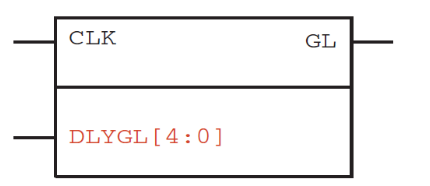
The CLKDLY is essentially a CLKBUF with a delay. The PLLINT macro is included to unambiguously show Designer which routing resources are required to connect the REFCLK input: The PLLINT is used when REFCLK is driven by a pad in a different I/O tile.
PLL for Fusion
The static PLL supports only a single input. The Combiner is able to combine the PLL with the regular CLKBUF macros and any of the CCC macros to utilize available unused globals.
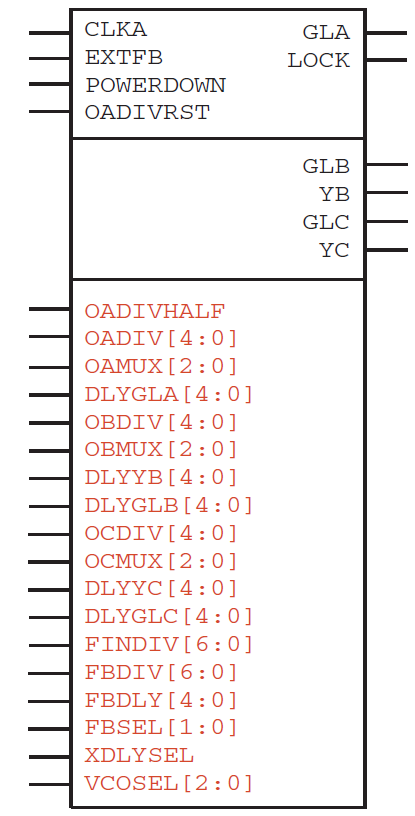
- Function: Static PLL
- Inputs/Outputs: See the following description for an explanation of the inputs and outputs available on the Static PLL for Fusion; all inputs are shown on the left, and outputs are to the right.
PLL for Fusion is available across the Fusion device family.
Microchip® recommends that you use SmartGen to generate your PLLs; SmartGen calculates the settings for all the pins in the PLL for the required input-output frequency combinations.
Refer to the latest Microchip datasheets on Clocking Resources for Fusion for more information. They are available at Microchip's website.
In the Figure 17-217 figure, all the required user-accessible inputs and outputs are above the top horizontal line. The ones below the top line are optional inputs and outputs. The static configuration inputs are below the third line. These pins can only be connected to GND or VCC.
OADIVRST may only be used when you bypass the PLL core (i.e. OAMUX = 001).
The purpose of the O(A/B/C)DIVRDST signals is to reset the output of the final clock divider in order to synchronize it with the input to that divider when the PLL is bypassed. The signal is active on a low to high transition. The signal must be low for at least one divider input clock frequency, and then shifted high for at least 3 input clock cycles for the reset operation to work correctly.
The following table summarizes the configuration control bits.
| NAME | FUNCTION |
|---|---|
| FINDIV<6:0> | 7-BIT INPUT DIVIDER (/N) |
| FBDIV<6:0> | 7-BIT FEEDBACK DIVIDER (/M) |
| OADIVHALF* | Division by half (see Fusion datasheet for more information) |
| OADIV<4:0> | 5-BIT OUTPUT DIVIDER (/U) |
| OBDIV<4:0> | 5-BIT OUTPUT DIVIDER (/V) |
| OCDIV<4:0> | 5-BIT OUTPUT DIVIDER (/W) |
| OAMUX<2:0> | 3-BIT POST-PLL MUXA (BEFORE DIVIDER /U) |
| OBMUX<2:0> | 3-BIT POST-PLL MUXB (BEFORE DIVIDER /V) |
| OCMUX<2:0> | 3-BIT POST-PLL MUXC (BEFORE DIVIDER /W) |
| FBSEL<1:0> | 2-BIT PLL FEEDBACK MUX |
| FBDLY<4:0> | FEEDBACK DELAY |
| XDLYSEL | 1-BIT PLL FEEDBACK MUX |
| DLYGLA<4:0> | DELAY ON GLOBAL A |
| DLYGLB<4:0> | DELAY ON GLOBAL B |
| DLYGLC<4:0> | DELAY ON GLOBAL C |
| DLYB<4:0> | DELAY ON YB |
| DLYC<4:0> | DELAY ON YC |
| VCOSEL<2:0> | 3-BIT VCO GEAR CONTROL (4 FREQUENCY RANGES) |
* OADIVHALF may only be used when you bypass the PLL core (i.e. OAMUX = 001) and the RC Oscillator (RCOSC) drives the CLKA input.
Static Clock with Divider and/or Delay
The Combiner is able to combine the clock conditioning circuit macro with the regular CLKBUF macros and the PLL to utilize available unused globals.
The CLKDLY is essentially a CLKBUF with a delay. The PLLINT macro is included to unambiguously show Designer which routing resources are required to connect the REFCLK input: The PLLINT is used when REFCLK is driven by a pad in a different I/O tile.
DYNCCC
DYNCCC is available across the IGLOO®, ProASIC®3 device families.
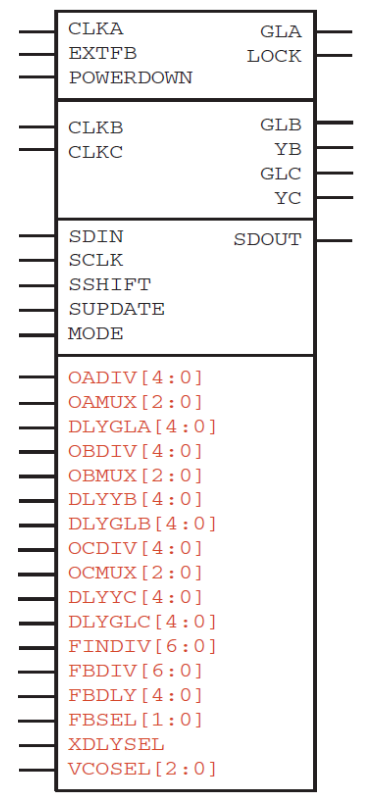
- Function: Dynamic PLL / Clock Conditioning Circuitry
- Inputs/Outputs: See the datasheet for an explanation of the inputs and outputs available on the Dynamic CCC for ProASIC3/E; all inputs are shown on the left, and outputs are to the right.
Microchip® recommends that you use SmartGen to generate your DYNCCCs; Smart-Gen calculates the settings for all the pins in the DYNCCC for the required input-output frequency combinations.
Refer to the latest Microchip datasheets on PLLs for ProASIC3 / ProASIC3E for more information. They are available at Microchip's website.
FAB_CCC
FAB_CCC is available across the SmartFusion® device family.
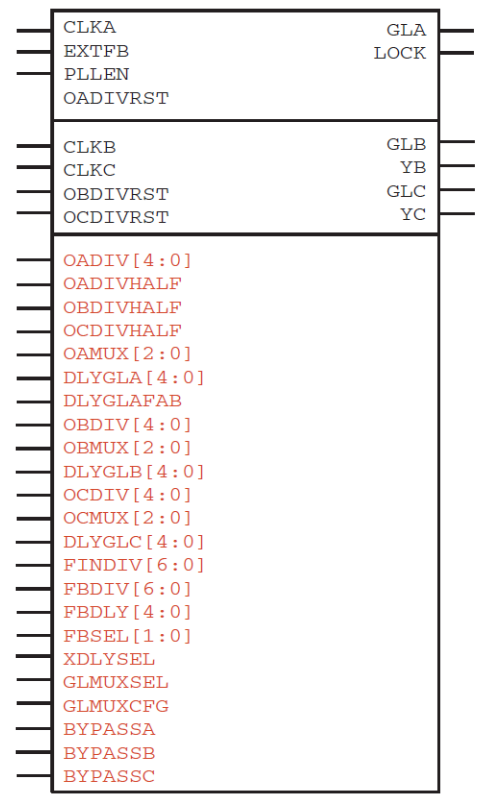
- Function: SmartFusion clock conditioning circuitry
- Inputs/Outputs: In the Figure 17-220 figure, inputs are listed on the left, and outputs on the right; see the SmartFusion datasheet for a full explanation of all inputs and outputs.
Microchip® recommends that you use SmartGen to generate your PLLs; SmartGen calculates the settings for all the pins in the PLL for the required input-output frequency combinations.
Refer to the latest Microchip® datasheets on CCCs for SmartFusion for more information. They are available at Microchip's website.
In the Figure 17-220 figure, all the required user-accessible inputs and outputs are above the top horizontal line. The ones below the top line are optional inputs and outputs.
OADIVRST may only be used when you bypass the PLL core (i.e. OAMUX = 001). The purpose of the O(A/B/ C)DIVRDST signals is to reset the output of the final clock divider in order to synchronize it with the input to that divider when the PLL is bypassed. The signal is active on a low to high transition. The signal must be low for at least one divider input clock frequency, and then shifted high for at least 3 input clock cycles for the reset operation to work correctly.
| Port Name | Direction | Source/Sink | Description |
|---|---|---|---|
| CLKA | Input | PAD/FPGA/RCOSC/ XTLOSC | Primary Reference Clock |
| EXTFB | Input | PAD/FPGA/GND | External feedback clock. When connected to GND, the feedback is internal |
| CLKB | input | PAD/FPGA/RCOSC/ XTLOSC | Secondary Reference Clock (bypass if used) |
| CLKC | Input | PAD/FPGA/RCOSC/ RTCXTL | Secondary Reference Clock (bypass if used) |
| GLA | Output | FPGA | Primary global output driving the FPGA |
| LOCK | Output | FPGA | PLL user lock |
| GLB | Output | FPGA | Secondary global output driving the FPGA |
| YB | Output | FPGA | Secondary routed output driving the FPGA; logically equivalent to GLB with a different delay insertion |
| GLC | Output | FPGA | Secondary global output driving the FPGA |
| YC | Output | FPGA | Secondary routed output driving the FPGA; logically equivalent to GLC with a different delay insertion |
| OADIV | Input | DSS | Primary output clock divider |
| OADIVHALF | Input | DSS | Primary output clock divider |
| OAMUX | Input | DSS | Primary output clock source selection |
| BYPASSA | Input | DSS | Primary output clock bypass source selection. It used to be equal to OAMUX != 000 in Fusion1 and G3. In Fusion2 it is an independent setting |
| DLYGLA | Input | DSS | GLA delay |
| DLYGLAFA B | Input | DSS | GLA output delay selection |
| OBDIV | Input | DSS | Secondary output clock divider |
| OBDIVHALF | Input | DSS | Secondary output clock divider |
| OBMUX | Input | DSS | Secondary output clock source selection |
| BYPASSB | Input | DSS | Secondary output clock bypass source selection. It used to be equal to OBMUX != 000 in Fusion1 and G3. In Fusion2 it is an independent setting |
| DLYGLB | Input | DSS | GLB output delay selection |
| OCDIV | Input | DSS | Secondary output clock divider |
| OCDIVHAL F | Input | DSS | Secondary output clock divider |
| OCMUX | Input | DSS | Secondary output clock source selection |
| BYPASSC | Input | DSS | Secondary output clock bypass source selection. It used to be equal to OCMUX != 000 in Fusion1 and G3. In Fusion2 it is an independent setting |
| DLYGLC | Input | DSS | GLC output delay selection |
| FINDIV | Input | DSS | PLL reference clock divider |
| FBDIV | Input | DSS | PLL feedback clock divider |
| FBDLY | Input | DSS | PLL feedback clock programmable delay selection |
| FBSEL | Input | DSS | PLL feedback clock source selection |
| XDLYSEL | Input | DSS | PLL feedback clock fixed delay selection |
| GLMUXSEL | Input | DSS | Glitchless mux selection |
| GLMUXCFG | Input | DSS | Glitchless mux configuration |
FAB_CCC_DYN
FAB_CCC is available across the SmartFusion® device family.
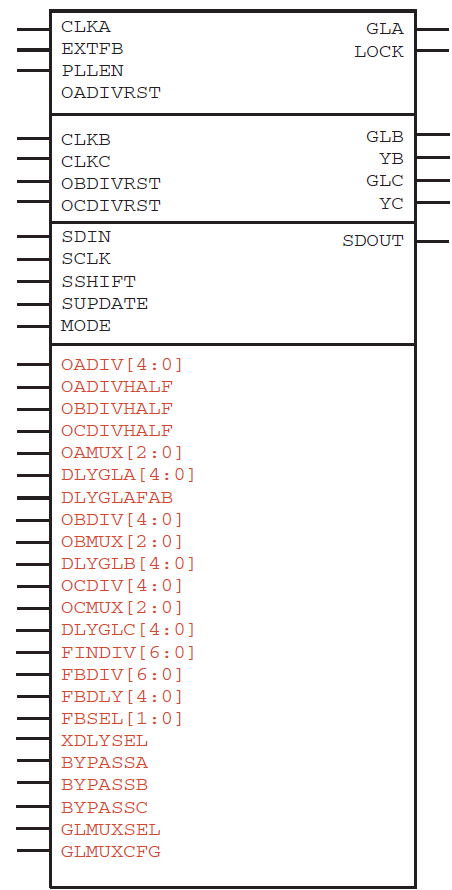
- Function: SmartFusion® dynamic clock conditioning circuitry
- Inputs/Outputs: In the Figure 17-221 figure, inputs are listed on the left, and out-puts on the right; see the SmartFusion datasheet for a full explanation of all inputs and outputs.
Refer to the latest Microchip® datasheets on CCCs for SmartFusion for more information. They are available at Microchip's website.
In the Figure 17-221 figure, all the required user-accessible inputs and outputs are above the top horizontal line. The ones below the top line are optional inputs and outputs.
OADIVRST may only be used when you bypass the PLL core (i.e. OAMUX = 001). The purpose of the O(A/B/ C)DIVRDST signals is to reset the output of the final clock divider in order to synchronize it with the input to that divider when the PLL is bypassed. The signal is active on a low to high transition. The signal must be low for at least one divider input clock frequency, and then shifted high for at least 3 input clock cycles for the reset operation to work correctly.
Ports are the same as the FAB_CCC macro but with the additions listed in the following table.
| Port Name | Direction |
|---|---|
| SDIN | Input |
| SCLK | Input |
| SSHIFT | Input |
| SUPDATE | Input |
| MODE | Input |
| SDOUT | Output |
External Feedback for PLL and DYNCCC
External feedback is implemented by relying on self-synchronization in-out on GLA. Since GLA is in the PLL loop, it automatically synchronizes to the incoming clock, and the additional synchronization circuits on divider U are disabled when external feedback is enabled.
GLB and GLC still have to rely on synchronization circuits for dividers V and W. As a result, GLA, GLB and GLC are synchronized when LOCK goes high.
External feedback comes with the following restrictions:
- Only GLA (the primary global) may be used as the signal for the external feedback loop.
- Division factor N is defined as: N = U*a where a = 1, 2, 3, ...
- Division factor M is defined as: M ≥5
- Total sum of delays in the feedback loop must be less than 1 VCO period and less than 1 CLKA (incoming clock) period. This restriction only applies to cases where V and or W dividers are used.
- M*U < 233
EXTFB must come from an I/O. This I/O is placed at one fixed location per CCC. Please refer to the Fusion, IGLOO® or ProASIC®3 datasheet for more information.
External feedback is supported on both PLL and DYNCCC cells for IGLOO®, ProASIC®3, SmartFusion® and Fusion families.
PLLINT
PLLINT is available across the Fusion IGLOO®, ProASIC®3 device families.
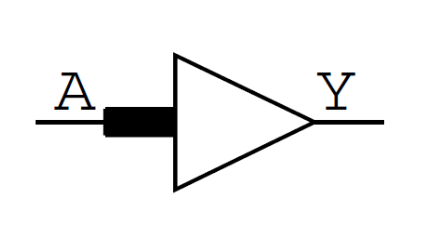
- Function: PLL Int
- Input: A
- Output: Y
| A | Y |
|---|---|
| 0 | 0 |
| 1 | 1 |
Use PLLINT to connect a signal from the FPGA array to the PLL reference clock (CLKA). The input to PLLINT may come from an I/O (excluding the dedicated I/Os for the PLL being driven), local routing or a global resource.
Refer to the latest Microchip® datasheets on PLLs and Clock Conditioning Circuits (CCC) application notes for more information. They are available at Microchip's website.
UJTAG
UJTAG is available across the Fusion IGLOO®, ProASIC®3 device families.
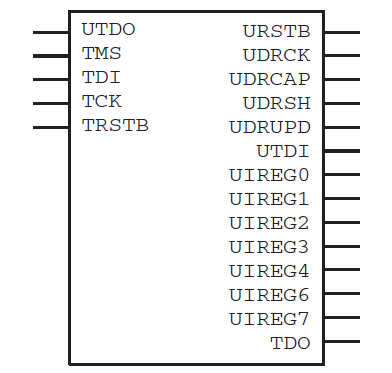
- Function: The UJTAG macro is a special purpose macro. It is provided to allow users access to the user JTAG circuitry on board the chip. You must instantiate a UJTAG macro in their design if they plan to make use of the user JTAG feature. It is identical to the APA and A500K UJTAG macro.
- Input: —
- Output: —
UFROM
UFROM is available across the Fusion IGLOO®, ProASIC®3 device families.
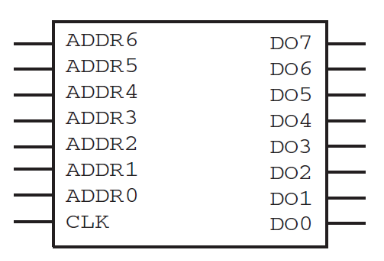
- Function: The UFROM is the USER FlashROM macro. It is a simple 128 X 8 synchronous read-only memory. There is only one UFROM per chip. New data appears on the DO pins after the falling edge of the clock pin. The UFROM can only be programmed by the user via the JTAG pins. There is currently no support for programming the UFROM in any of the CAE tools or libraries, however the simulation models utilize a memory initialization file so users can specify the contents of the memory for simulation purposes. The memory initialization file is an ASCII format text file containing exactly 128 lines of 8-character binary strings.
- Input: ADDR[0:6], CLK
- Output: DO[7:0]
Data outputs always transition to X on the rising edge of the input CLK. Please refer to the datasheet for more information.
UFROMH
UFROMH is available across the Fusion IGLOO®, ProASIC®3 device families.
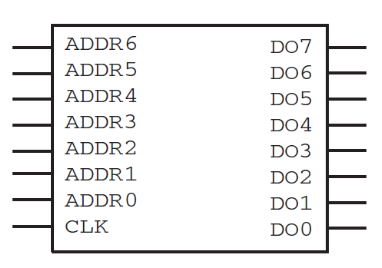
- Function: UFROMH is a fixed placement version of the UFROM macro. Microchip® highly recommends that you use this macro instead of UFROM.
- Input: ADDR[0:6], CLK
- Output: DO[7:0]
ULSICC
ULSICC is available across the Fusion, ProASIC®3 device families.
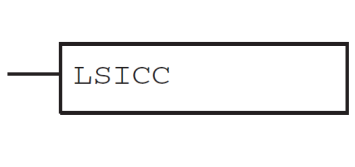
- Function: Low standby ICC configuration macro.
- Input: LSICC
- Output: —
Refer to the latest Fusion, ProASIC3 or ProASIC3E datasheet (Microchip's website) for more information on this macro.
RCOSC
RCOSC is available across the Fusion device family.
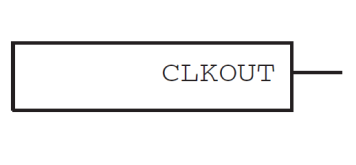
- Function: On-chip free-running clock source that generates a 100 Mhz clock.
- Input: —
- Output: CLKOUT
Refer to the Clocking Resources of the Fusion datasheet for more information on this macro. The Fusion datasheet is available at Microchip's website.
XTLOSC
XTLOSC is available across the Fusion device family.
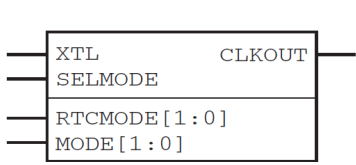
- Function: On-chip crystal oscillator circuit that works with an off-chip crystal to generate a high-precision clock.
- Input: —
- Output: CLKOUT
Refer to the Clocking Resources of the Fusion datasheet for more information on this macro. The Fusion datasheet is available at Microchip's website.
The XTLOSC requires a physical connection to an external crystal, ceramic resonator, or a resistor/capacitor network. For simulation purposes you can use the XTL pin to provide a clock signal running at the desired input frequency.
CLKSRC
CLKSRC is available across the Fusion device family.
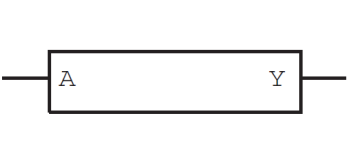
- Function: Clock buffer used to connect either the RCOSC or the XTLOSC to the core.
- Input: A
- Output: Y
Refer to the Clocking Resources of the Fusion datasheet for more information on this macro. The Fusion datasheet is available at Microchip's website.
CLKDLY
CLKDLY is available across the Fusion IGLOO®, ProASIC®3 device families.
- Function: On-chip crystal oscillator circuit that works with an off-chip crystal to generate a high-precision clock.
- Input: —
- Output: CLKOUT
Refer to the Clocking Resources of the Fusion and ProASIC3/E datasheets for more information on this macro. They are available at Microchip's website.
CLKDIVDLY
CLKDIVDLY is available across the Fusion device family.
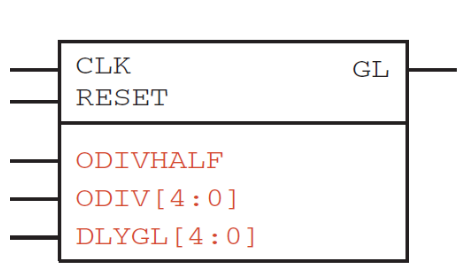
- Function: Static clock with divider and/or delay with global output driver only.
- Input: CLK, RESET, ODIVHALF, ODIV[4:0], DLYGL[4:0]
- Output: GL
Refer to the Clocking Resources of the Fusion and ProASIC®3/E datasheets for more information on this macro. They are available at Microchip's website.
CLKDIVDLY1
CLKDIVDLY1 is available across the Fusion device family.
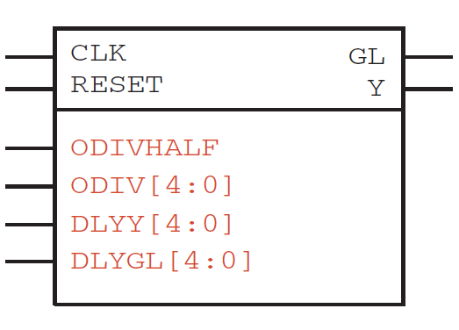
- Function: Static clock with divider and/or delay with both global output driver and regular net driver.
- Input: CLK, RESET, ODIVHALF, ODIV[4:0], DLYY[4:0], DLYGL[4:0]
- Output: GL, Y
Refer to the Clocking Resources of the Fusion datasheet for more information on this macro. It is available at Microchip's website.
NGMUX
NGMUX is available across the Fusion device family.
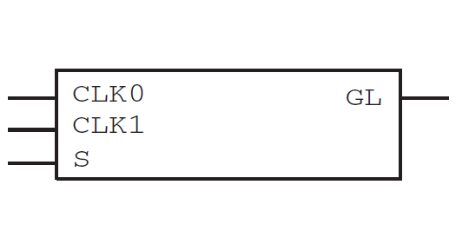
- Function: No-glitch MUX. NGMUX provides a special switching sequence between two asynchronous clock domains to avoid generating any unwanted narrow clock pulses.
- Input: CLK0, CLK1, S
- Output: GL
Refer to the Clocking Resources of the Fusion datasheet for more information on this macro. It is available at Microchip's website.
Transition S from high to low to initiate a switch to CLK0, and from low to high to initiate a switch to CLK1. The output of NGMUX is undefined if S switches again before the previous switch operation has completed.