
13.15.10 Slicing
Bus ports can be sliced or split using Slicing. Then the sliced ports can be connected as regular ports.
To create a slice:
- Select a bus port, right-click, and choose Add
Slice. This brings up the Add Slice dialog box (see figure below).
Figure 13-37. Add Slice Dialog Box 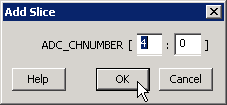
- Enter the parameters for the slice and click OK.
Note: Once a slice is created, other bus ports or slices of compatible size can be connected
to it. Overlapping slices cannot be created for IN and INOUT ports on instances or top-level
OUT ports.
To remove a slice, select the slice, right-click, and choose Delete Slice.