13.31.11 Custom Security Levels
For advanced use, you can customize your security levels.
To set custom security levels:
- Click the Custom Level button in the Security Settings page. The Custom Security Level dialog box appears.
- Select the FPGA Array Security
and the FlashROM Security levels. ForSmartFusion and Fusion devices, you
can also choose the Embedded Flash Memory Block level of security. The FPGA Array
and the FlashROM can have different Security Settings. See the tables below for a
description of the custom security option levels for FPGA Array and FlashROM.
Table 13-24. FPGA Array Security Option Description Lock for both writing and verifying

Allows writing/erasing and verification of the FPGA Array through the JTAG interface only with a valid Pass Key.
Lock for writing

Allows the writing/erasing of the FPGA Array only with a valid Pass Key. Verification is allowed without a valid Pass Key.
Use the AES Key for both writing and verifying

Allows the writing/erasing and verification of the FPGA Array only with a valid AES Key through the JTAG interface. This configures the device to accept an encrypted bitstream for reprogramming and verification of the FPGA Array. Use this option if you intend to complete final programming at an unsecured site or if you plan to update the design at a remote site in the future. Accessing the device security settings requires a valid Pass Key.
Allow write and verify

Allows writing/erasing and verification of the FPGA Array with plain text bitstream and without requiring a Pass Key or an AES Key. Use this option when you develop your product in-house.
Note: The ProASIC3 family FPGA Array is always read protected regardless of the Pass Key or the AES Key protection.Table 13-25. FlashROM Security Option Description Lock for both reading and writing

Allows the writing/erasing and reading of the FlashROM through the JTAG interface only with a valid Pass Key. Verification is allowed without a valid Pass Key.
Lock for writing

Allows the writing/erasing of the FlashROM through the JTAG interface only with a valid Pass Key. Reading and verification is allowed without a valid Pass Key.
Use the AES Key for both writing and verifying
Allows the writing/erasing and verification of the FlashROM through the JTAG interface only with
 a valid AES Key. This configures the device to accept an encrypted bitstream for reprogramming and verification of the FlashROM. Use this option if you complete final programming at an unsecured site or if you plan to update the design at a remote site in the future.Note: The bitstream that is read back from the FlashROM is always unencrypted (plain text).
Allow reading, writing, and verifying

Allows writing/erasing, reading and verification of the FlashROM content with a plain text bitstream and without requiring a valid Pass Key or an AES Key.
Note: The FPGA Array can always read the FlashROM content regardless of these Security Settings.Table 13-26. Embedded Flash Memory Block Security Option Description Lock for reading, verifying, and writing

Allows the writing and reading of the Embedded Flash Memory Block through the JTAG interface only with a valid Pass Key. Verification accomplished by reading back and compare.
Lock for writing

Allows the writing of the Embedded Flash Memory Block through the JTAG interface only with a valid Pass Key. Reading and verification is allowed without a valid Pass Key.
Use AES Key for writing

Allows the writing of the Embedded Flash Memory Block through the JTAG interface only with a valid AES Key. This configures the device to accept an encrypted bitstream for reprogramming of the Embedded Flash Block. Use this option if you complete final programming at an unsecured site or if you plan to update the design at a remote site in the future. The bitstream that is read back from the Embedded Flash Memory Block is always unencrypted
(plain text), when a valid pass key is provided.
Allow reading, writing, and verifying

Allows writing, reading and verification of the Embedded Flash Memory Block content with a plain text bitstream and without requiring a valid Pass Key or an AES Key.
- To make the Security Settings
permanent, select Permanently lock the security settings check box. This
option prevents any future modifications of the Security Setting of the device. A
Pass Key is not required if you use this option.Note: Note: When you make the Security Settings permanent, you can never reprogram the Silicon Signature. If you Lock the write operation for the FPGA Array or the FlashROM, you can never reprogram the FPGA Array or the FlashROM, respectively. If you use an AES key, this key cannot be changed once you permanently lock the device.
- (SmartFusion Only) Enable M3 Debugger option enables access to the M3 debugger even if security is enforced. Select the Enable M3 debugger checkbox if you want to access the M3 debugger after programming.
- To use the Permanent FlashLock™
feature, select Lock for both writing and verifying for FPGA Array and
Lock for both reading and writing for FlashROM and select the
Permanently lock the security settings checkbox as shown in the figure
below. This will make your device one-time-programmable.
Figure 13-124. Custom Security Level 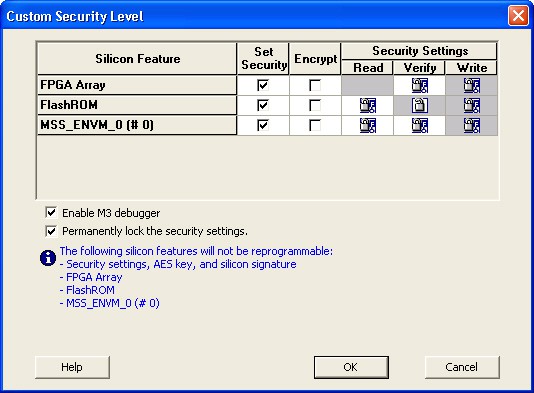
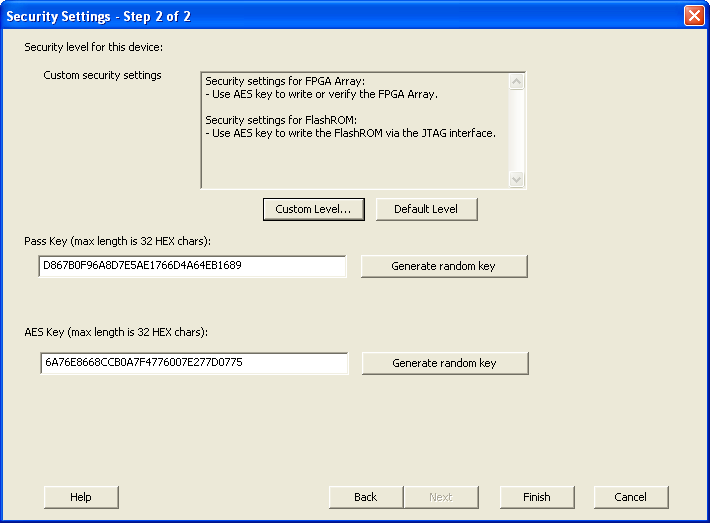
- Click the OK button. The
Security Settings page appears with the Custom security settings
information as shown in the figure below.
Figure 13-125. Security Settings