
13.31.12 Reprogramming a Secured Device
You must know the previous Security Settings of the device before you can reprogram a device with Security Settings.
To program a secured device:
- In the Generate Programming
File window, click the Programming previously secured devices(s)
check box (see figure below).
Figure 13-126. Generate Programming File 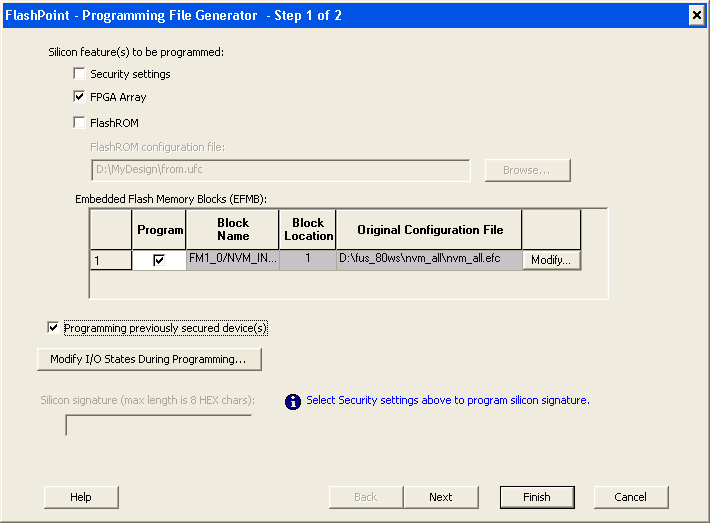
- Specify the previously programmed security setting for the FlashROM and/or the FPGA Array. To generate a programming file for encrypted programming please ensure that the Security settings checkbox is unchecked.
- If you programmed the device with
a custom security level, click the Custom Level button to open the Custom
security dialog box, and select the Security Settings for the FPGA Array
or the FlashROM that you programmed (see figure below).
Figure 13-127. Security Settings 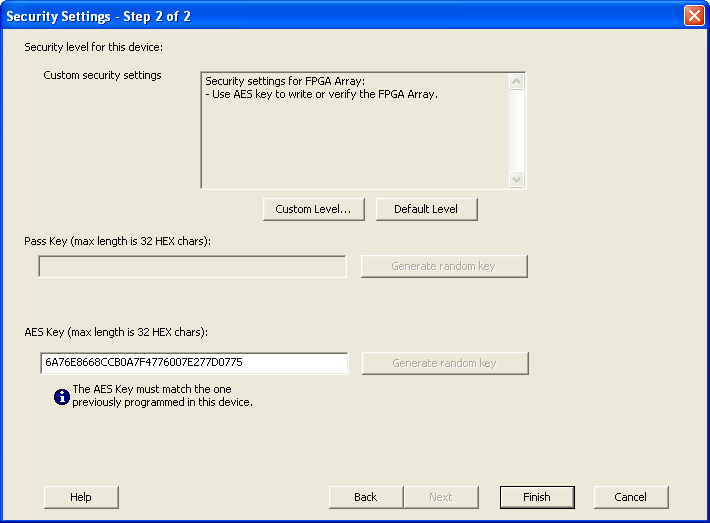
- Enter the previously programmed Pass Key and/or the AES Key.
- Click Finish.
Note: Enter the AES Key only if you want to perform encrypted
programming.