
13.31.8 Programming the FlashROM
You can program selected memory pages and specify the region values of the FlashROM.
- Single STAPL file for all devices: generates one programming file with all the generated increment values or with values in the custom serialization file.
- One STAPL file per device: generates one programming file for each generated increment value or for each value in the custom serialization file.
- Select your target Programmer type.
- Select Generic STAPL Player when generating STAPL files for generic STAPL players.
- Select Silicon Sculptor II, BP Auto Programmer, or FlashPro4/3x/3 when generating programming files for those programmers.
- Select Microchip IHP (In House Programming) when generating STAPL or SVF files for Microchip IHP.
- Click OK.
FlashPoint generates your programming file.
Note: You cannot change the FlashROM region configuration from FlashPoint. You can only change the configuration from the FlashROM core generator.For more information, click the Help button in FlashROM.
To program FlashROM:
- Select FlashROM from the Generate Programming File page.
- Enter the location of the FlashROM
configuration file. The FlashROM Settings page appears (see figure below).
Figure 13-122. FlashROM Settings 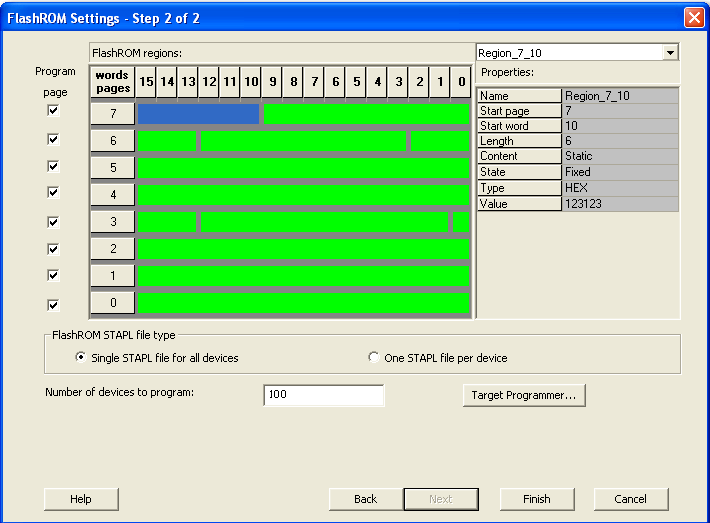
- Select the FlashROM memory page that you want to program.
- Enter the data value for the configured regions.
- If you selected the region with a Read From File, specify the file location.
- If you selected the Auto Increment region, specify the Start and Max
values.
Enter the number of devices you want to program.
Select your target Programmer Type.
Figure 13-123. Select Programmer 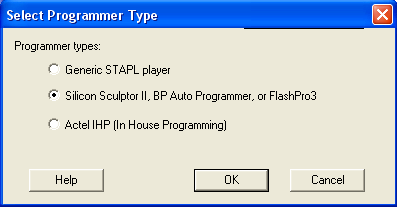
- Click Finish.
FlashPoint generates your programming file.
Note: You cannot change the FlashROM region configuration from FlashPoint. You can only
change the configuration from the FlashROM core generator.