
20.3.4 Define Clock Domains and Set of Pins
When you run SmartPower, it researches your existing clock domains and partitions your design automatically. You may wish to review the list of clock domains in the Domains tab to ensure that all the clocks of your design are included in the list. Add or remove clocks as necessary.
To add a new clock domain:
- Click the Domains tab, and click the Add Domain button. Select Clock Domain from the drop-down list. This opens the Create Clock Domain dialog box.
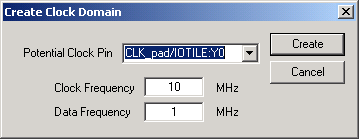
- To create a new clock, select a Potential Clock Pin, specify a clock and data frequency, and click Create. The new clock domain appears in the Domains window. If you select an existing clock pin from the drop-down list, the lists of clock pins and data pins of this new clock domain are computed automatically based on the netlist topology.