
5.32.15 Specifying I/O States During Programming
In Libero IDE, the I/O states can be set prior to programming, and held at the set values during programming. In Libero IDE, this feature is only available once layout is completed.
- From the Designer GUI, click the Modify I/O States During Programming button. The Programming File Generator window appears.
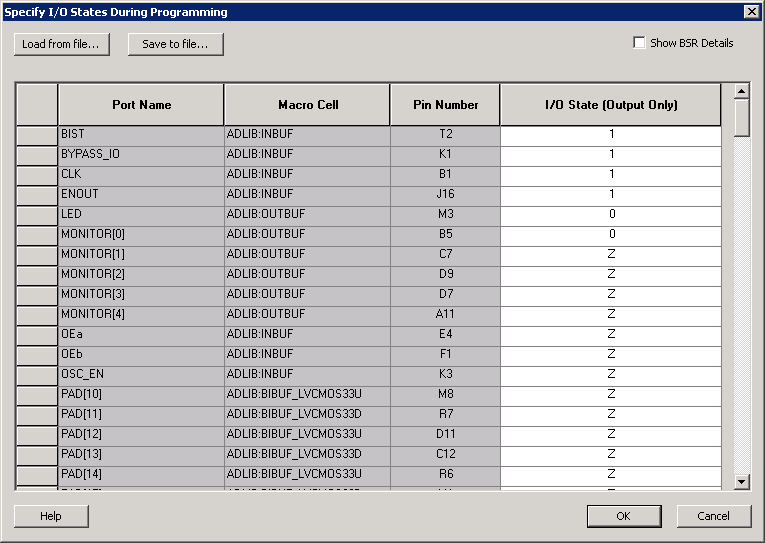
- Click the Specify I/O States During Programming button to display the Specify I/O States During Programming dialog box.
- Sort the pins as desired by clicking any of the column headers to sort the entries by that header. Select the I/Os you wish to modify (as shown in the figure below).
- Set the I/O Output state. You can set Basic I/O settings if you want to use the default I/O settings for your pins, or use Custom I/O settings to customize the settings for each pin. See the Specifying I/O States During Programming - I/O States and BSR Details help topic for more information on setting your I/O state and the corresponding pin values. Basic I/O state settings are:
- 1 – I/O is set to drive out logic High
- 0 – I/O is set to drive out logic Low
- Last Known State: I/O is set to the last value that was driven out prior to entering the programming mode, and then held at that value during programming
- Z - Tri-State: I/O is tristated
- Click OK to return to the FlashPoint – Programming File Generator window.
I/O States During programming are saved to the ADB and resulting programming files after completing programming file generation.