
5.16.2.1 Pin and Attribute Icons
Unconnected pins that do not require a connection are gray.  Unconnected pins that require a connection are red.
Unconnected pins that have a default tie-off are pale green. Connected pins are green. 
Right-click a pin to assign an attribute.
Pins assigned attributes are shown with an icon, as shown in the table below.
Attribute | Icon |
Tie Low |
|
Tie High |
|


Attribute | Icon |
Invert |
|
Mark as Unused |
|


See the Canvas Icons reference page for definitions for each element on the Canvas.
Each connection made using a bus interface is shown in a separate connection known as a 'bus-interface net' (shown in brown lines).
Move the mouse over a bus interface to display its details (as shown below).
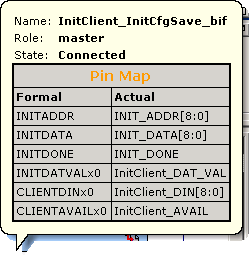
Hover over a bus interface net to see details (as shown below).
