
2.9.2 Configuring the DDR3 Subsystem
(Ask a Question)The PF_DDR3 macro located in the Libero IP catalog must be instantiated in SmartDesign to access the DDR3 memory from the FPGA fabric. The DDR3 configurator, shown in Figure 2-51, configures the DDR3 subsystem. It supports the following modes:
- Preset configuration—allows selection from a list of memory vendors
and devices to preset all of the memory initialization and timing parameters into the
DDR3 Configurator, as shown in Figure 1.Important: For DDR3, preset configuration is supported for 1333, 1600, 1866, and 2133 at 666.67 MHz (minimum tCK ≥ 1.5 ns). For DDR4, preset configuration is supported for 1600, 1866, 2133, 2400, 2666, 2933, and 3200 at 800 MHz (minimum tCK ≥ 1.25 ns).
Figure 2-49. DDR3 Configurator—Preset Configuration 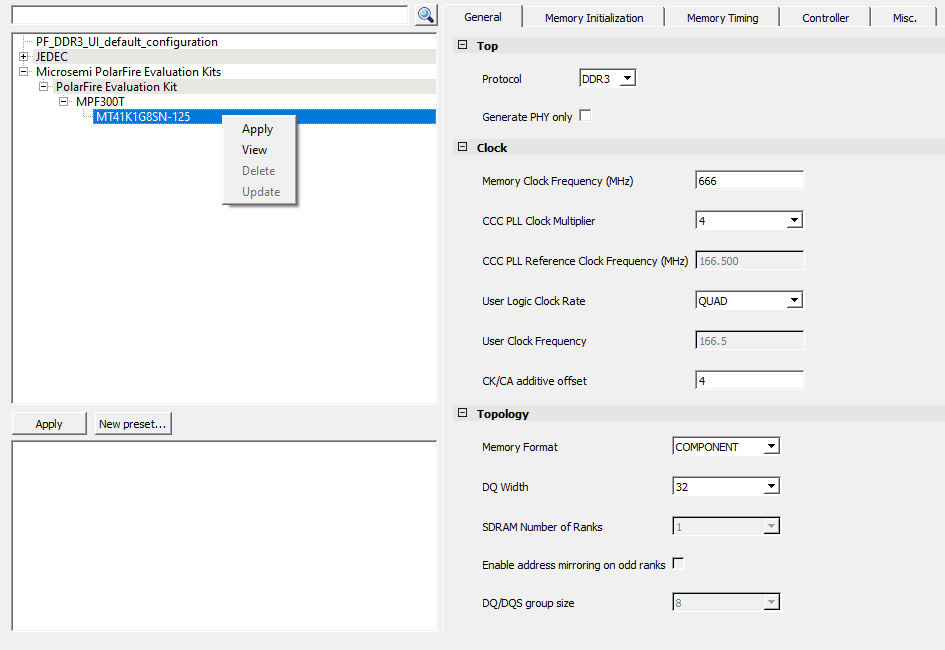
- User configuration—allows manual configuration of all memory
initialization and timing parameters. This can be saved as a preset configuration, as
shown in Figure 2.Important: See the DDR3 vendor datasheets before configuring DDR3 parameters.
Figure 2-50. User-Defined Configuration 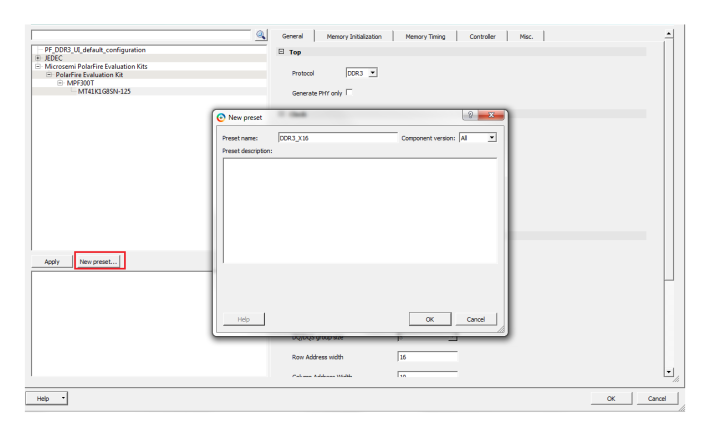 The DDR3 Configurator provides the following configuration options.
General
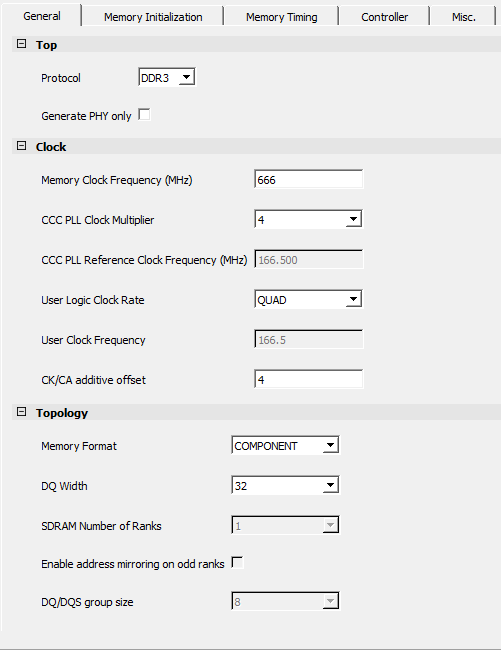
As shown in the preceding figure, the General tab provides the following options.
- Top
- Protocol: By default, this is set to DDR3.
- Generate PHY only: Enable this option to create a PHY-only DDR3 subsystem.
- Clock: To set
the DDR3 memory clock frequency and user logic clock rate. The user clock frequency
is automatically populated.
- Memory Clock Frequency (MHz): Valid range 0 to 667 MHz.
- CCC PLL Clock Multiplier: Valid range 1 to 49.
- CCC PLL Reference Clock Frequency (MHz): Depends upon the setting of CCC PLL Clock Multiplier.
- User Logic Clock Rate: QUAD
- User Clock Frequency: 166.5 MHz
- CK/CA additive offset: The value must be within 0–7. The default value is 4.
- Topology- To
set the topology of the memory system, including the address bits, bank
configurations, DM modes, and ECC.
- Memory Format: COMPONENT or type of DIMM (UDIMM, RDIMM, LRDIMM, or SODIMM)
- DQ
Width: 16-bit, 32-bit, or 64-bitImportant: AXI width must be larger than the data width and clock rate.
- SDRAM Number of Ranks: 1
- Enable address mirroring on odd ranks: Disabled
- DQ/DQS group size: 8 (fixed)
- Row Address width: Value must be within 12-16
- Column Address Width: Value must be within 5-12
- Bank Address width: 3 (fixed)
- Enable DM: OFF or DM
- Enable Parity/Alert: When the memory format is RDIMM or LRDIMM, this option can be selected to support the Alert signal from DDR memory when it detects a CA parity error.
- Enable ECC: Disabled
- Number of clock outputs: 1 (fixed)
Memory Initialization
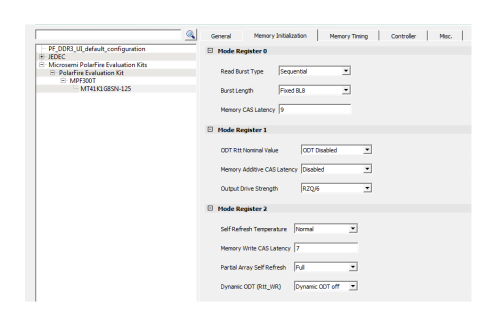
As shown in the preceding figure, the Memory Initialization options provides the following options.
- Mode Register
0
- Read Burst Type: Sequential or Interleaved
- Burst
length: Fixed BL8Important: On-the-fly BC4 or BL8 option for burst length mode is not supported for QUAD clock rate.
- Memory CAS Latency: Value must be within 5-14
- Mode Register
1
- ODT Rtt Nominal
Value: Any one of the following options can be selected:
- ODT Disabled
- RZQ/4
- RZQ/2
- RZQ/6
- RZQ/12 for non-write
- RZQ/8 for non-write
- Memory Additive CAS
Latency: Any one of the following options can be selected:
- Disabled
- CL-1
- CL-2
- Output Drive
Strength: Any one of the following options can be selected:
- RZQ/6
- RZQ/7
- ODT Rtt Nominal
Value: Any one of the following options can be selected:
- Mode Register
2
- Self Refresh
Temperature : Any one of the following options can be
selected:
- Normal
- Extended
- Memory Write CAS Latency: Value must be within 5–12
- Partial Array Self
Refresh: Any one of the following options can be selected:
- Full
- Half
- Quarter
- 1/8
- Half (reversed)
- Quarter (reversed)
- 1/8 (reversed)
- Dynamic ODT
(Rtt_WR): Any one of the following options can be selected:
- Dynamic ODT off
- RZQ/4
- RZQ/2
- Self Refresh
Temperature : Any one of the following options can be
selected:
Memory Timing
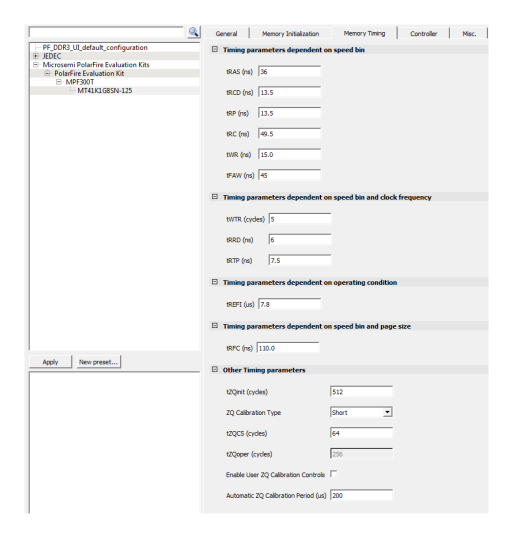
As shown in the preceding figure, the Controller options provides the following options.
- Timing parameters
dependents on speed bin
- tRAS (ns): By default, preset configuration for the MT41K1G8SN-125 part is selected. Preset values for different configurations according to the JEDEC standard are supported. See the speed bin and its corresponding value in the vendor data sheet.
- tRCD (ns): By default, preset configuration for the MT41K1G8SN-125 part is selected. Preset values for different configurations according to the JEDEC standard are supported. See the speed bin and its corresponding value in the vendor data sheet.
- tRP (ns): By default, preset configuration for the MT41K1G8SN-125 part is selected. Preset values for different configurations according to the JEDEC standard are supported. See the speed bin and its corresponding value in the vendor data sheet.
- tRC (ns): By default, preset configuration for the MT41K1G8SN-125 part is selected. Preset values for different configurations according to the JEDEC standard are supported. See the speed bin and its corresponding value in the vendor data sheet.
- tWR (ns): By default, preset configuration for the MT41K1G8SN-125 part is selected. Preset values for different configurations according to the JEDEC standard are supported. See the speed bin and its corresponding value in the vendor data sheet.
- tFAW (ns): By default, preset configuration for the MT41K1G8SN-125 part is selected. Preset values for different configurations according to the JEDEC standard are supported. See the speed bin and its corresponding value in the vendor data sheet.
- Timing parameters dependents on speed bin and clock
frequency
- tWTR (cycles): By default, preset configuration for the MT41K1G8SN-125 part is selected. Preset values for different configurations according to the JEDEC standard are supported. See the speed bin and its corresponding value in the vendor data sheet.
- tRRD (ns): By default, preset configuration for the MT41K1G8SN-125 part is selected. Preset values for different configurations according to the JEDEC standard are supported. See the speed bin and its corresponding value in the vendor data sheet.
- tRTP (ns): By default, preset configuration for the MT41K1G8SN-125 part is selected. Preset values for different configurations according to the JEDEC standard are supported. See the speed bin and its corresponding value in the vendor data sheet.
- Timing parameters
dependents on operating condition
- tREFI (us): By default, preset configuration for the MT41K1G8SN-125 part is selected. Preset values for different configurations according to the JEDEC standard are supported. See the speed bin and its corresponding value in the vendor data sheet.
- Timing parameters
dependents on speed bin and page size
- tRFC (ns): By default, preset configuration for the MT41K1G8SN-125 part is selected. Preset values for different configurations according to the JEDEC standard are supported. See the speed bin and its corresponding value in the vendor data sheet.
- Others Timing
parameters
- tZQinit (cycles): By default, 512 is selected. The value must be within [512, 4095] range.
- ZQ Calibration Type: Select Short or Long. By default, Short is selected.
- tZQCS (cycles): By default, 64 is selected. The value must be within [64, 2047].
- tZQoper (cycles): This value is fixed to 256.
- Enable User ZQ Calibration Controls: Enable or Disable. By default, this option is disabled.
- Automatic ZQ
Calibration Period (us): By default, 200 µs is selected. For
every 200 µs, ZQ calibration is triggered based on the ZQCL or ZQCS cycles
selected.Important:
- By default, preset configuration for the MT41K1G8SN-125 part is selected. Preset values for different configurations according to the JEDEC standard are supported. See the speed bin and its corresponding value in the vendor datasheet.
Controller
The following figure shows the Controller tab.
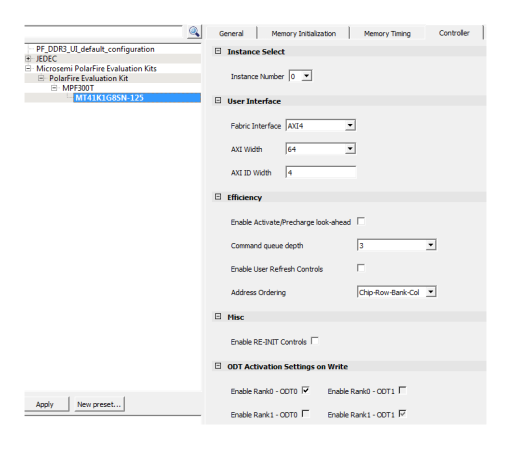
As shown in the preceding figure, the Controller options provides the following options.
- Instance
Select: Enables selection of the DDR3 subsystem instance number that
is used to unify the controller instance. The PolarFire family supports a maximum of
six DDR3 subsystem instances.
- Instance Number: Up to eight instances can be generated.
-
User Interface:
- Fabric Interface: Options are AMBA AXI3/4 and native interface. The following table lists the supported AXI bus data widths with respect to the DQ widths.
- Data Bus Turnaround—provides additional bus turnaround time between different SDRAM ranks. The turnaround time is the number of clock cycles it takes to change the access from one rank to another rank for back-to-back memory accesses (read to read, read to write, write to write, and write to read). The AXI interface address is mapped based on the type of the Address Ordering selected in the PF_DDR3 configurator. For example, if Chip-Row-Bank-Col is selected, and if a row address width and column address width is configured for 13 and 11, the AXI address is mapped as shown in the following table.
Table 2-28. Supported AXI Bus Data Width DQ Width Supported AXI Data Bus Width x16 64, 128 x32 64, 128, 256 x64 512 -
Table 2-29. AXI Address Mapping AXI Address 31 30 29 28 27 26 25 24 23 22 21 20 19 18 17 16 15 14 13 12 11 10 9 8 7 6 5 4 3 2 1 0 Column Address C10 C9 C8 C7 C6 C5 C4 C3 C2 C1 C0 Bank Address BA2 BA1 BA0 Row Address R12 R11 R10 R9 R8 R7 R6 R5 R4 R3 R2 R1 R0 Important: The address mapping shown in the preceding table is applicable to Native interface also. - AXI Width: 64, 128, 256, or 512
- AXI ID Width: Valid range is 1-8
- Efficiency:
Provides control over memory refresh, precharge, and address ordering options. Queue
depth can be set to 3 or 4 for DDR3 using the Command queue depth option on DDR3
Configurator > Controller tab.
- Enable Activate/Precharge look-head: Check box toggle option
- Command queue depth: 3 or 4
- Enable User Refresh Controls: Check box toggle option
- Address
Ordering: Any one of the following options is supported:
- Chip-Bank-Row-Col
- Chip-Row-Bank-Col
- Misc
- Enable RE-INIT Controls: When selected, the configurator exposes the CTRLR_INIT signal. The initialization begins when this signal is asserted high for minimum 4 clock cycles in the fabric clock domain.
- ODT Activation Setting on
Write: Provides options to enable ODT on write operations.
- Enable Rank0 - ODT0: By default, this option is enabled and can be disabled.
- Enable Rank0 - ODT1: Not supported
- Enable Rank1 - ODT0: Not supported
- Enable Rank1 - ODT1: By default, this option is enabled and cannot be disabled.
Miscellaneous
The following figure shows the Misc. tab.
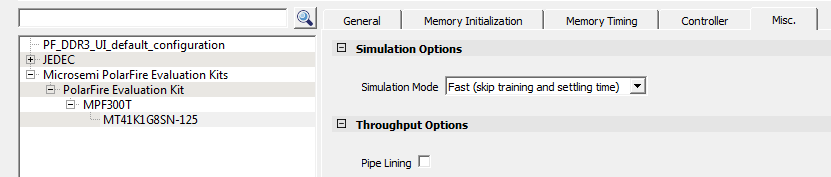
The Misc. tab is used to select the simulation mode and expose the debug interface. As shown in the preceding figure, the Misc. options provides the following options.
- Simulation
Options
- Simulation
mode:
- Fast (skip training and settling time): In this mode, the DDR3 subsystem skips the DDR3 training sequence and asserts CTRLR_READY without waiting for the settling time. CTRLR_READY is asserted within 8 μs.
- Training (skip settling time): In this mode, the DDR3 subsystem performs the DDR3 training sequence but asserts CTRLR_READY without waiting for settling time. CTRLR_READY is asserted within 240 μs.
- Full (training and settling time): In this mode, the DDR3 subsystem performs the DDR3 training sequence and also waits for settling time before asserting CTRLR_READY. In this mode, CTRLR_READY is asserted within 10 ms.
- Simulation
mode:
- Throughput
Options
- Pipe Lining: Adds pipeline registers to Training IP (TIP) write and read data path to improve static timing closure.