
2.3.3 Instantiating DDR3 Memory Controller
(Ask a Question)This application notes demonstrates how to build and debug an application from DDR3 memory. Executing an application from DDR3 memory in the release mode requires a bootloader. The bootloader use case isn't in the scope of this application notes.
If you are using the Rev D Kit, configure the DDR IP as follows. (If you are using Rev F Kit, see Appendix 3 - References)
- From the Catalog, drag the PolarFire DDR3 IP core to SmartDesign.
- In the Create Component dialog box, enter PF_DDR3_C0 as the component name, and then click OK.
- In the left pane of the Configurator, expand .
- Left-click MT41K1G8SN-125, and then click Apply, as shown in the following figure.
Figure 2-10. Apply Option for MPF300T 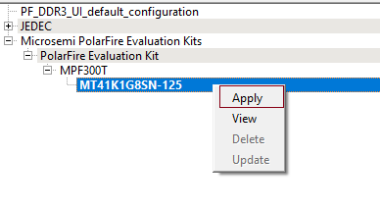
This configures the DDR3 controller with the initialization and timing parameters of the DDR3 memory (MT41K1G8SN-125) present on the PolarFire Evaluation kit.
In the right pane of the Configurator, click on the General tab, set the CCC PLL Clock Multiplier to 8, and the DQ Width to 16, as shown in the following figure.
The clock multiplier value of 8 sets the CCC PLL reference clock frequency to 83.333 MHz. A reference clock of this frequency is required for the PLL present inside the DDR3 subsystem. The PLL generates a 666.666 MHz DDR3 memory clock frequency and a 166.666 MHz DDR3 AXI clock frequency.
The DQ Width is set to 16 to match the width of the DDR3 memory present on the board.
Figure 2-11. DDR3 General Configuration 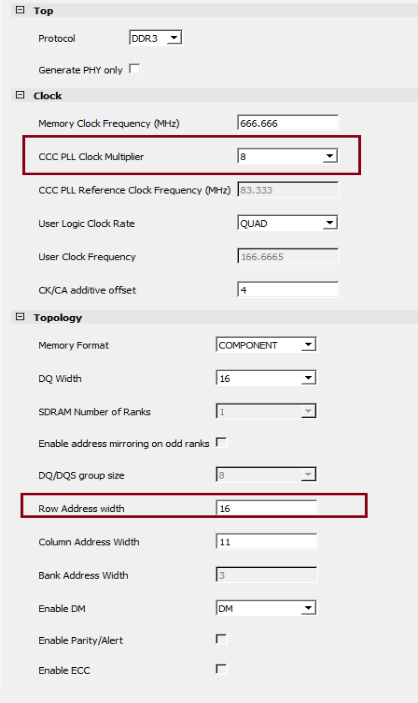
- On the Controller tab, ensure that the settings are as follows:
- Instance Number: 0
- Fabric Interface: AXI4
- AXI ID Width: 4
- Enable Rank0 - ODT0 check box: Selected
Figure 2-12. DDR3 Controller Configuration 
- Retain the default settings for other tabs, and then click OK.