2.3.1 Instantiating Mi-V Processor IP
(Ask a Question)To instantiate the Mi-V Processor IP, perform the following steps:
- From the Catalog, drag the MIV_RV32 to SmartDesign.
- In the Create Component dialog box, enter MiV_RV32_C0 as the component name, and then click OK.
- In the Configurator window, under the Configuration tab, set the following configuration:
- Set to 0x8000 and retain the default setting for Lower 16bits (Hex) as shown in the following figure. This is the address the processor will start executing from after a reset.
- Ensure that the interface options for AHB initiator is set to none and AXI4 for AXI initiator, as shown in the following figure.
- Under Tightly Coupled Memory (TCM) Options, enable TCM option.
- Disable Timer Options.
Figure 2-4. Mi-V Configuration 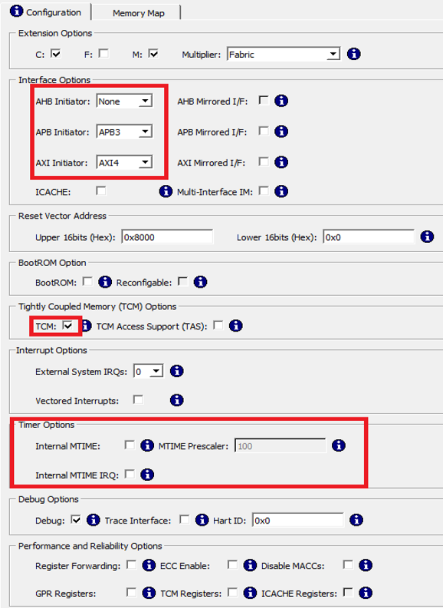
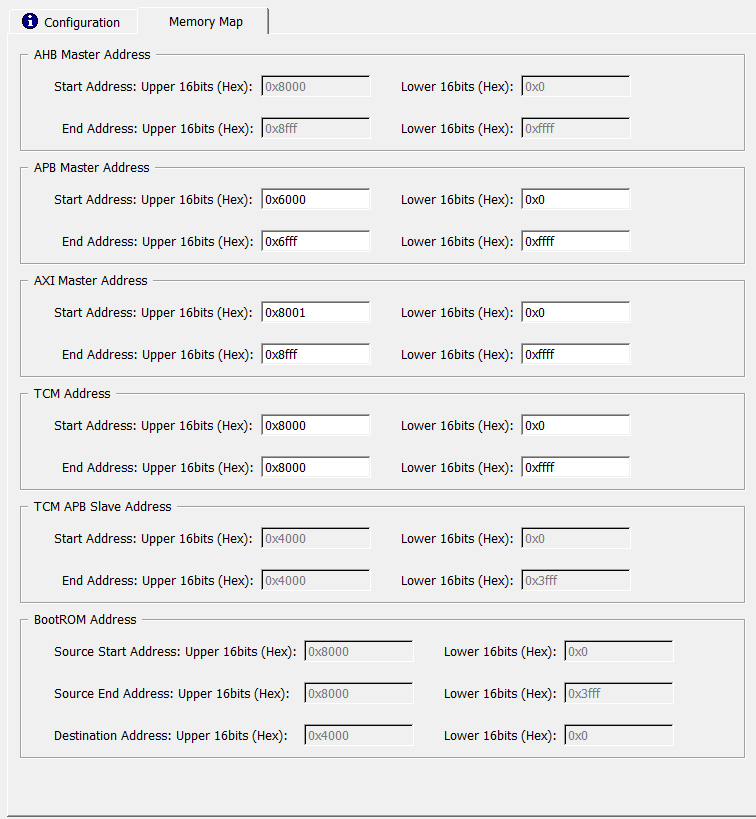
- Click the Memory Map tab to review the memory map settings of TCM, DDR3, and APB peripherals, as shown in the following figure.
Figure 2-5. TCM and DDR3 Memory Map