
2.3.4 Instantiating PolarFire Clock Conditioning Circuitry (CCC)
(Ask a Question)The PolarFire Clock Conditioning Circuitry (CCC) block generates a 83.333 MHz clock to the processor subsystem, which is used as a reference clock to the PF_DDR3_C0_0 PLL. To instantiate the CCC block, perform the following steps:
- From the Catalog, drag the Clock Conditioning Circuitry (CCC) core to SmartDesign.
- In the Create Component dialog box, enter PF_CCC_C0 as the component name, and click OK.
- In the Configurator screen, set the configuration to PLL-Single.
- In the Clock Options PLL tab, perform the following.
- Set the Input Frequency to 50 MHz.
- Under Power/Jitter, select Maximize VCO for Lowest Jitter.
- Set the feedback mode to Post-VCO.
- Set the Bandwidth to High.
Figure 2-13. CCC Configurator Clock Options PLL Tab 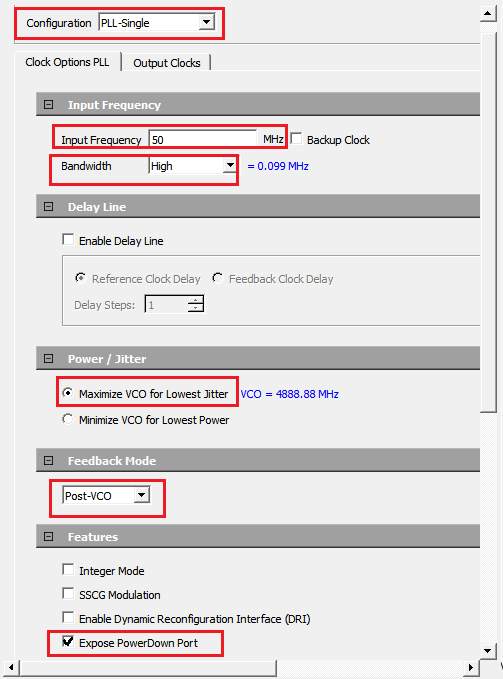
- In the Output Clocks tab, under the Output Clock 0 section, perform the following.
- Select the Enabled check box to enable PLL output 0.
- Set the Requested frequency to 83.333 MHz.
- Select the Global Clock checkbox.
Figure 2-14. CCC Configurator Output Clocks Tab 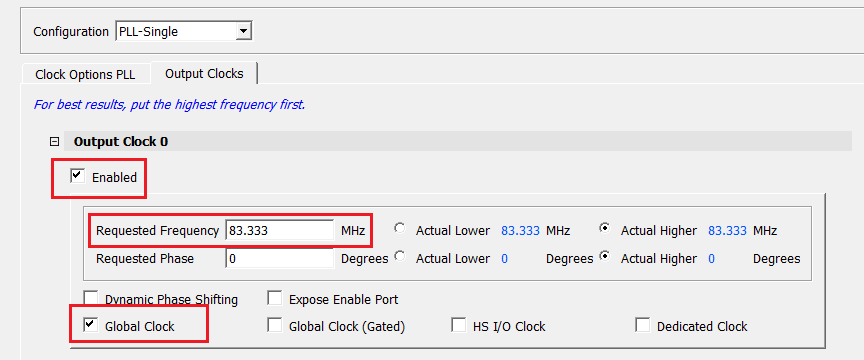
- Click OK.