To instantiate the MiV ESS core, perform the following steps:
From the Catalog, drag the MiV_ESS IP core to SmartDesign.
In the Create Component dialog box, enter MIV_ESS_C1 as the component name, and then click OK.
In the MiV ESS Configurator screen, perform the following configurations:
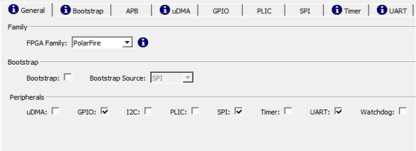
Navigate to General tab, and make sure that the configurations are same as shown in the following figure.
Deselect Bootstrap.
Select the following peripherals: GPIO, SPI, and UART, and deselect all others.
Figure 2-16. General Configurator
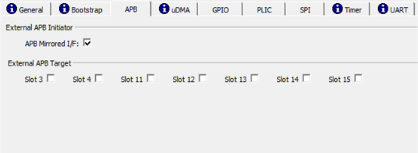
Navigate to APB tab, and enable APB Mirrored I/F as shown in the following figure.Figure 2-17. APB Configurator
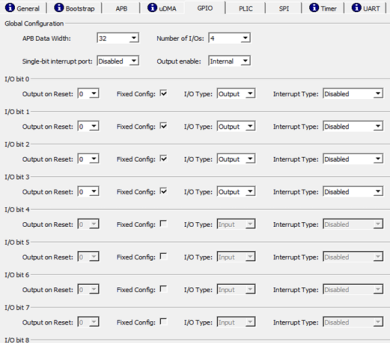
Navigate to GPIO tab, and make sure that the configurations are same as shown in the following figure.Figure 2-18. GPIO Configurator
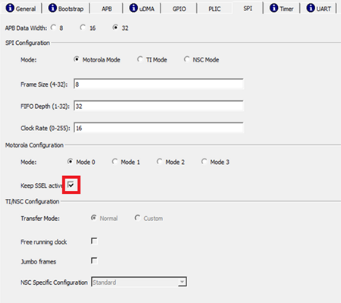
Navigate to SPI tab, and check the option of Keep SSEL active. Make sure that the configurations are same as shown in the following figure.Figure 2-19. SPI Configurator
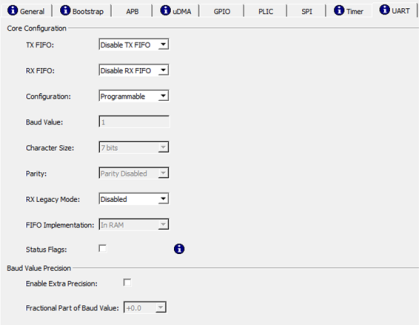
Navigate to UART tab, and make sure that the configurations are same as shown in the following figure.Figure 2-20. UART Configurator
To generate the component, click
OK.
The following figure shows the top SmartDesign after all the components are instantiated.Figure 2-21. Top SmartDesign with All Components Instantiated
The online versions of the documents are provided as a courtesy. Verify all content and data in the device’s PDF documentation found on the device product page.