
9.6.2 Programmer Settings
The Programmer Settings dialog box includes setting options for FlashPro®4/3/3X, FlashPro® Lite and FlashPro®.
Note: You can set the TCK setting in the PDB/STAPL file by selecting the TCK frequency in the
Programmer Settings dialog box
Limitation of the TCK frequency for the selected programmer:
- FlashPro supports 1-4 MHz
- FlashPro Lite is limited to 1, 2, or 4 MHz only.
- FlashPro4/3/3X supports 1-4 MHz.
Limitation of the TCK frequency for the target device:
- IGLOO, ProASIC3, and Fusion – 10MHz to 20MHz
- ProASICPLUS and ProASIC – 10 MHz.
During execution, the frequency set by the FREQUENCY statement in the PDB/STAPL file will override the TCK frequency setting selected by you in the Programmer Settings dialog box unless the Force TCK Frequency checkbox is selected.
To set your programmer settings:
- From the Tools menu,
choose Programmer Settings. The Programmer
Settings dialog box appears.
Figure 9-96. Programmer Settings Dialog Box for FlashPro 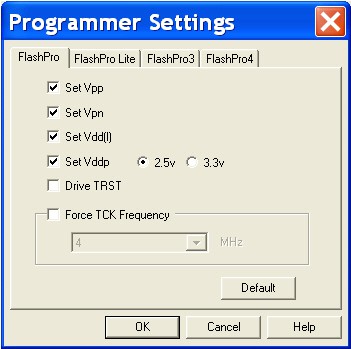
- Click a programmer tab and check the appropriate settings for your programmer.
- Click OK.