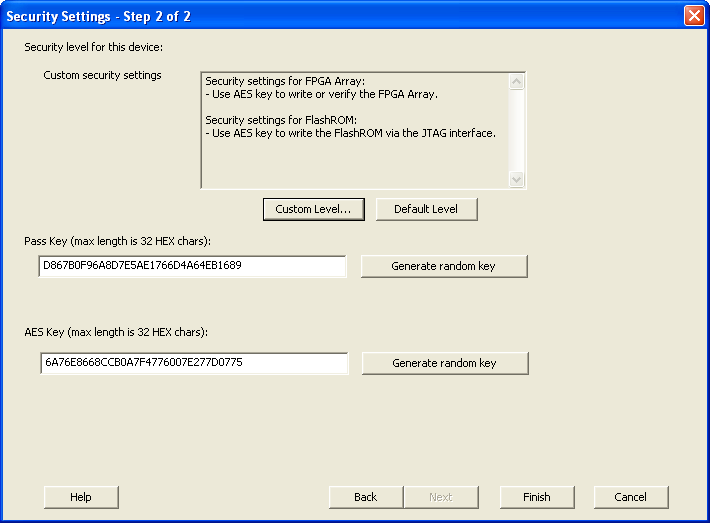
5.32.11.1 Security Settings
When you make the Security Settings permanent, you can never reprogram the Silicon Signature. If you Lock the write operation for the FPGA Array or the FlashROM, you can never reprogram the FPGA Array or the FlashROM, respectively. If you use an AES key, this key cannot be changed once you permanently lock the device
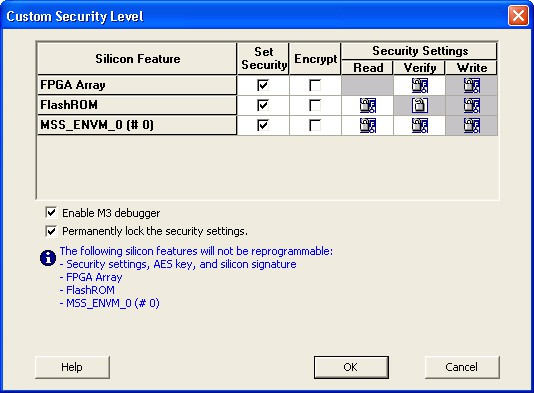
- (SmartFusion Only) Enable M3 Debugger option enables access to the M3 debugger even if security is enforced. Select the Enable M3 debugger checkbox if you want to access the M3 debugger after programming.
- To use the Permanent FlashLock™ feature, select Lock for both writing and verifying for FPGA Array and Lock for both reading and writing for FlashROM and select the Permanently lock the security settings checkbox as shown in the figure below. This will make your device one-time-programmable.
- Click the OK button. The Security Settings page appears with the Custom security settings information as shown in the figure below.