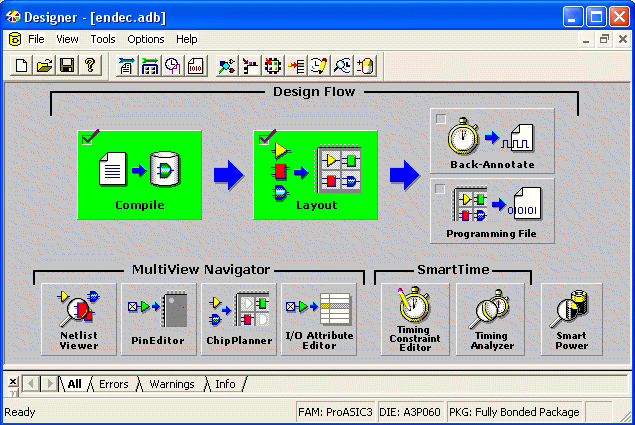
Compile the design before using the SmartTime Constraints Editor or SmartTime Timing Analyzer. If not compiled, Designer compiles it before opening the selected tool.
Note: If you open SmartTime before running Layout, Designer shows pre-layout timing. If you open SmartTime after running Layout, Designer shows post-layout timing.
To run SmartTime, perform the following steps:
Import the netlist
Compile your design
Run Layout
To start SmartTime, either click the SmartTime Timing Constraints Editor or SmartTime Timing Analyzer button in the Designer Design Flow window, or from the Tools menu, choose SmartTime Constraints Editor or SmartTime Timing Analyzer.
The following figure shows the Design Flow window.Figure 21-1. Design Flow Window
SmartTime reads the design and displays post- or pre-layout timing information. To close SmartTime, from the File menu, choose Exit.
To save changes to the design, from the File menu, choose Commit.
Note: In order to save the changes to disk, also save the changes in Designer.