19.13 Customizing Assigned and Unassigned list boxes
You can customize which pins are displayed in the Assigned and Unassigned list boxes.
To customize the list boxes:
- From the View
menu, choose Configure List Boxes.
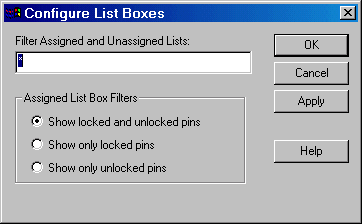
- Filter Assigned and Unassigned Lists - Entering a specific pin name in this field filters out all other pins in the Assigned and Unassigned list boxes. Use the * wildcard to filter for groups.
- Show locked and unlocked pins - Select to display all locked and unlocked pins in the Assigned list box
- Show only locked pins - Select to filter out all unlocked pins from the Assigned list box
- Show only unlocked pins - Select to filter out all locked pins from the Assigned list box
- Click Apply to see changes. When done, click OK.