
14.15 Simulation Support for GCLR/GPSET in Axcelerator
In Axcelerator, during power up, all the sequential elements in the Fabric are set to 0 or 1 via a Global SET/ CLR fuse. You can choose the SET/CLR option when generating the programming file. Each sequential element in the fabric has two additional controls, GCLR/GPSET, which are active only during power up. After power up GCLR/GPSET inputs are pulled high and user inputs are active (as shown in the following figure).
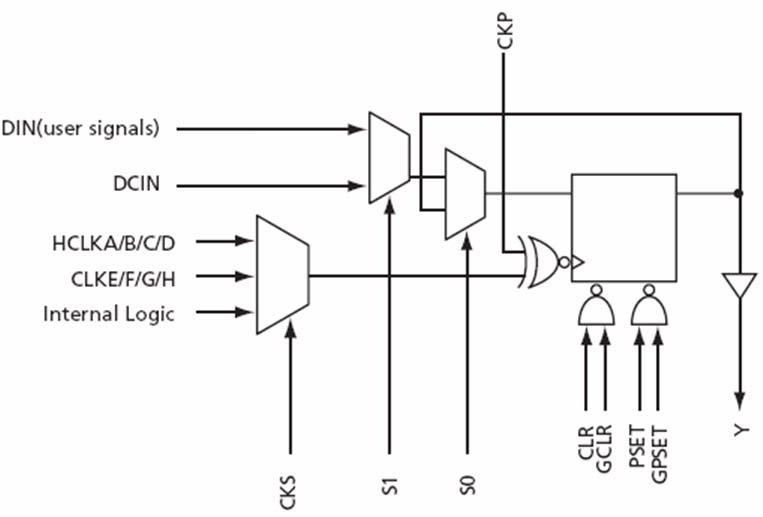
Since GPSET and GCLR are not user inputs, CAE macros do not have them. Libero IDE v9.0SP1 adds simulation support for the power up behavior of sequential elements.
In Libero IDE v9.0SP1 two additional precompiled Axcelerator libraries and one source file are provided for Axcelerator. In total there are three precompiled libraries for Verilog and three precompiled libraries for VHDL. The libraries are installed when you choose the AX family during installation. Libraries related to Axcelerator can be found under precompiled directories in the installation:
<installation>/Designer/lib/modelsim/precompiled (as shown in the following table).
| Directory | Description | Power Up State |
|---|---|---|
| /vlog/axcelerator | Verilog library without gclr/gpset support | Legacy |
| /vlog/axcelerator_gpset | Verilog library with gpset support | 1 |
| /vlog/axcelerator_gclr | Verilog library with gclr support | 0 |
| /vhdl/axcelerator | VHDL library without gclr/gpset support | Legacy |
| /vhdl/axcelerator_gpset | VHDL library with gpset support | 1 |
| /vhdl/axcelerator_gclr | VHDL library without gclr support | 0 |
By default, Libero IDE maps the simulation library to the old library, i.e.
/vlog/axcelerator or /vhdl/axcelerator. If you want GPSET/GCLR behavior, you can map the library to one of the two new libraries.
At 0th time CLR/PRE is applied to every flip-flop or latch and is removed at some pre-defined time called POWERUP_TIME (100 ns). This pre-defined time can be modified by editing a define statement or constant in the source files. During the power up time user controls do not impact the behavior of the sequen-tial element. This is according to the silicon behavior where user inputs are inactive until the power up is complete. After the power up time the sequential element behaves normally.