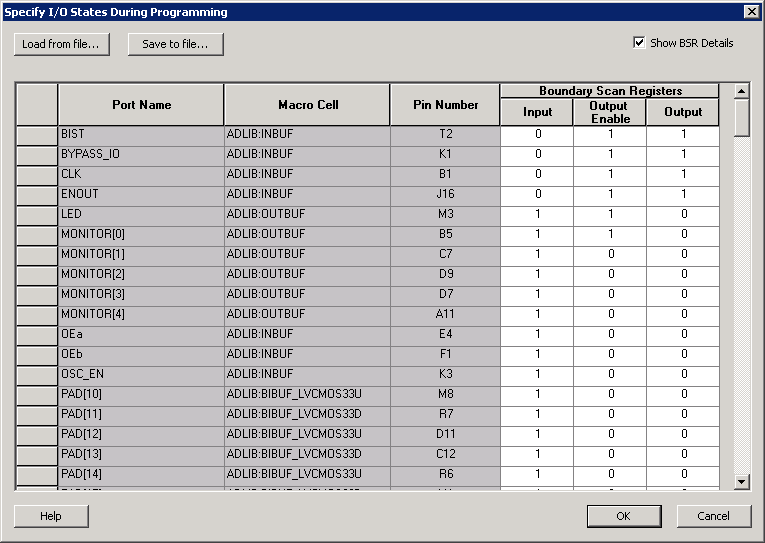
5.32.17.2 Boundary Scan Registers - Enabled with Show BSR Details
Sets your I/O state to a specific output value during programming AND enables you to customize the values for the Boundary Scan Register (Input, Output Enable, and Output). You can change any Don't Care value in Boundary Scan Register States without changing the Output State of the pin (as shown in the table below).
For example, if you want to Tri-State a pin during programming, set Output Enable to 0; the Don't Care indicates that the other two values are immaterial.
If you want a pin to drive a logic High and have a logic 1 stored in the Input Boundary scan cell during programming, you may set all the values to 1.
Output State | Settings | ||
Input | Output Enable | Output | |
Z (Tri-State) | Don't Care | 0 | Don't Care |
0 (Low) | Don't Care | 1 | 0 |
1 (High) | Don't Care | 1 | 1 |
Last Known State | Last State | Last State | Last State |
Table Key:
- 1 – High: I/Os are set to drive out logic High
- 0 – Low: I/Os are set to drive out logic Low
- Don't Care – Don’t Care values have no impact on the other settings.
- Last_Known_State – Sampled value: I/Os are set to the last value that was driven out prior to entering the programming mode, and then held at that value during programming
The figure below shows an example of Boundary Scan Register settings.