
9.13.13 Specifying I/O States During Programming
You can modify I/O states during programming in FlashPro®. This feature is supported for PDB files generated from Designer v8.5 or later.
Note: PDB files generated from Designer versions 8.1 through 8.4 (including all service packs)
display pin numbers only.
Before modifying I/O states, a PDB file must be loaded in FlashPro. To specify I/O states during programming:
- Load a PDB file in the FlashPro graphical user interface.
- From the FlashPro GUI, click PDB Configuration. A FlashPoint – Programming File Generator window appears.
- Click Specify I/O States During Programming. The Specify I/O States During Programming dialog box appears.
- Sort the pin list as needed by clicking the column headers. Select the I/Os you wish to modify.
- Set the I/O Output State. You can choose
either Basic I/O settings or Custom I/O settings for individual pins. For detailed
information, see the Specifying I/O States During Programming - I/O States and BSR Details
section.The available Basic I/O state settings are:
- 1 : I/O is set to drive out logic High.
- 0 : I/O is set to drive out logic Low.
- Last Known State: I/O is set to the last value driven before entering the programming mode, and then held at that value during programming.
- Z : Tri-State: I/O is tristated.
Figure 9-133. I/O States During Programming Window 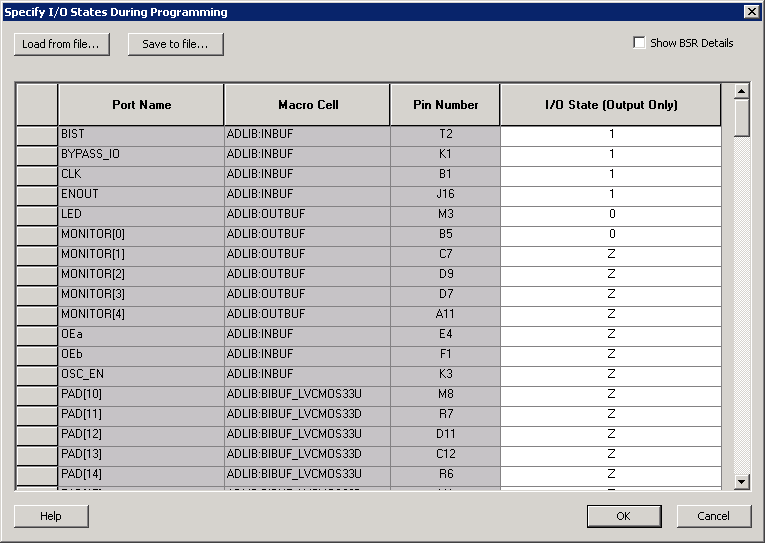
- Click OK to return to the FlashPoint – Programming File Generator window.
Note: I/O states specified during programming are saved to the ADB and included in the resulting
programming files after programming file generation is complete.