To see buffers inserted by the synthesis tool due to the high-fanout number of some signals, use
NetlistViewer. To view inserted buffers, click NetlistViewer in
the Design Flow window. NetlistViewer starts and displays the
netlist.
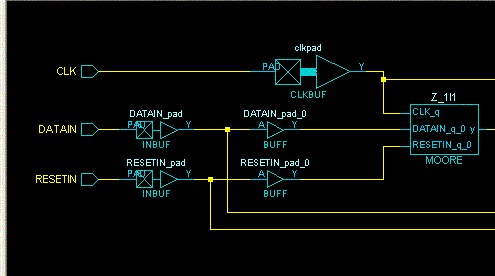
In the following example, the fanout of DATAIN and RESET inputs of the design exceeds the
specified value in the Synplicity synthesis tool. To reduce the number of fanout for
these signals, Synplicity inserts two buffers in their path. To see these inserted
buffers, use NetlistViewer, as shown in the following figure.Figure 16-24. Inserted Buffers