
16.5 Highlighting Objects
Highlight objects or groups of objects for easy reference. By default, NetlistViewer displays highlighted objects in red.
Use the following procedures to highlight and unhighlight objects in the Schematic window:
- To highlight an object:
- Select the object in the NetlistViewer.
- From the Edit menu, select Highlight, or click the Highlight button in the toolbar. The object changes color.
Figure 16-8. Highlight Object 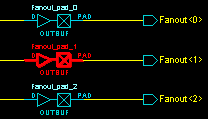
- To highlight a group of objects:
- Press and hold down the SHIFT key, and then click each object you want to highlight.
- From the Edit menu, select Highlight, or click the Highlight toolbar button. This can be useful for tracing a net.
Figure 16-9. Highlighting Groups of Objects 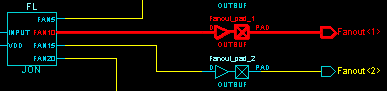
- To unhighlight an object or group of objects:
- Select the object(s) to highlight.
- From the Edit menu, select Un-Highlight, or click the Unhighlight toolbar button.
- To unhighlight all highlighted objects, from the Edit menu, select Clear Highlight, or click the Clear Highlight toolbar button.