
9.4.6.3 Modify FlashROM Content
Now you can to modify the FlashROM content.
- Click the PDB Configuration button. This opens FlashPoint.
- Select FlashROM under
Silicon feature(s) to be programmed.
Figure 9-43. FlashPoint Programming File Generator 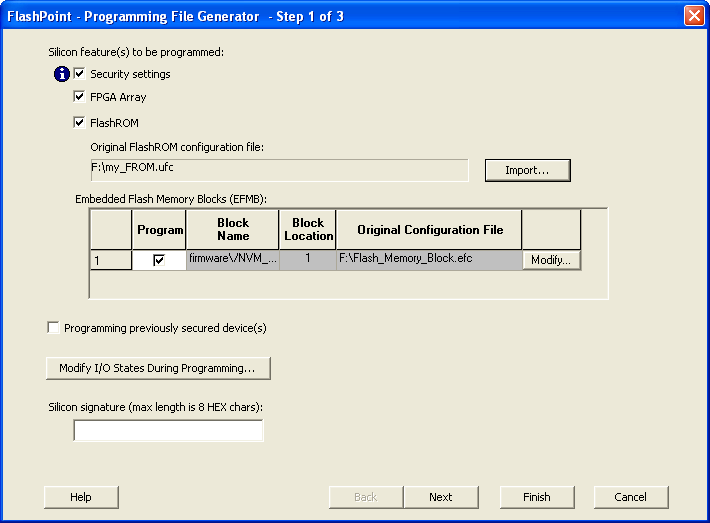
- Click the Browse button to select the *.ufc FlashROM configuration file by and navigating to the configuration file. This file is normally present in the SmartGen subfolder of the Libero IDE project, in a folder with the FlashROM IP block's name.
- Click Next.
- Select the FlashROM pages you want to program.
Figure 9-44. FlashROM Settings Dialog Box 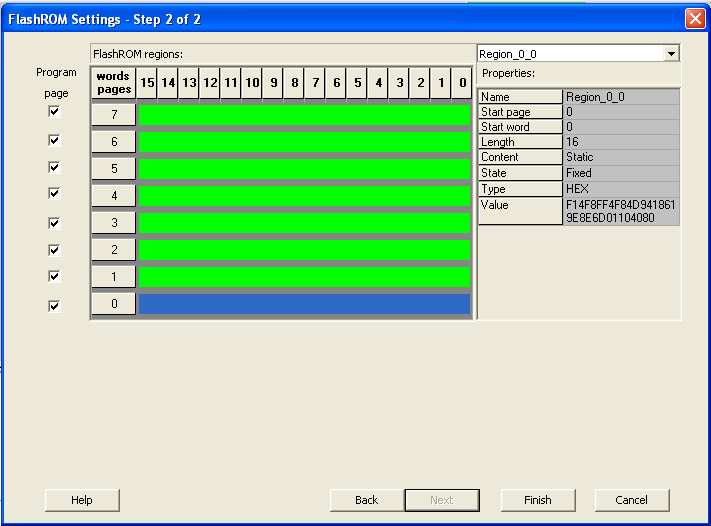
- Click Finish.
After modifying the FlashROM content, proceed to program the device. For step‑by‑step instructions, see the Programming a Device section in the Single STAPL/PDB File Basic Tutorial..