
9.4.10 Specify I/O States During Programming Tutorial
This tutorial explains how to modify the I/O states during programming within FlashPro® for used and unused I/Os. It also explains how to modify the Boundary Scan Registers (BSRs) for each I/O to allow for more detailed customization of the I/O states during programming. Finally, it shows how to save and load these settings with a file.
You can also modify the individual Boundary Scan Registers; see the Modify Boundary Scan Registers section for more information.
To modify the state of an I/O during programming:
- Once your PDB is successfully loaded, from the Configuration menu, choose PDB Configuration. This brings up FlashPoint . FlashPoint is the tool that allows you to modify the PDB programming file from within FlashPro.
- In FlashPoint, click the Specify I/O
States During Programming button. The Specify I/O States During
Programming dialog box appears (as shown below). This dialog box enables you
to modify the I/O states during programming for all used and unused I/Os.
Figure 9-57. I/O States During Programming Window 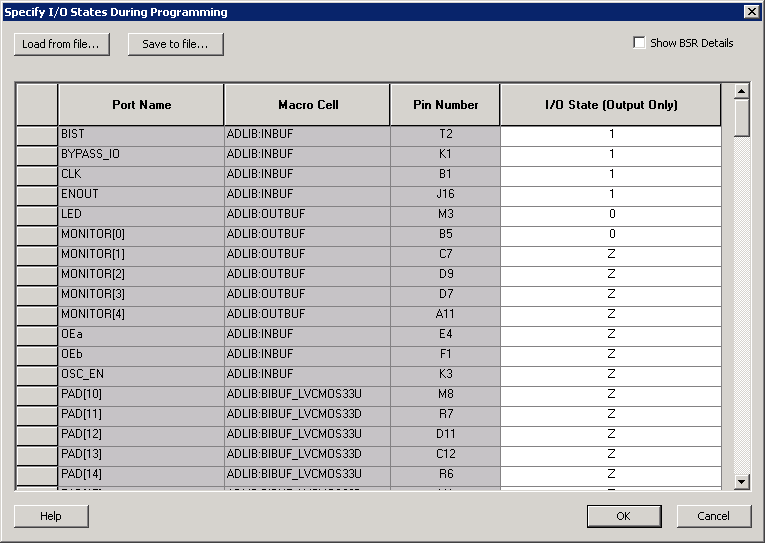 The default view displays a grid with 4 columns:
- Port Name: Port Name lists the port associated with each of theses pins, if the pin is not used in the design, the Port Name for this pin reads Unused.
- Macro Cell: The Macro Cell column contains the Actel macro associated with each pin, as with Port Names, if the pin is not used, the Macro Cell for this pin reads Unused.
- Pin Number: The Pin Number column contains a list of all the pins for the package associated with the design open in FlashPro.
- I/O State (Output Only): The I/O State column is the only column editable in FlashPro.
- Select an I/O State from the drop-down menu
for each I/O you want to modify.
Please refer to Specifying I/O States During Programming for information on sorting and selecting multiple entries in the grid.
- Click Save in the Specify I/O States During Programming window, then Finish in FlashPoint to return to FlashPro. The PDB is updated with your new settings.
Congratulations, you have successfully modified the I/O states that will be held during programming.