
9.4.8 Automatic Chain Construction Tutorial
This tutorial demonstrates how to automatically scan a chain of devices and construct the chain within FlashPro®. Automatic chain construction eliminates the need to manually add each device to the programming chain.
During this process, the software scans the chain before constructing it, reducing the likelihood of configuration errors. Automatic chain construction is fully supported when the chain consists only of Actel devices. If the chain includes non‑Actel devices, automatic construction can still be used; however, you must manually provide either a BSDL file or specify the IR length and maximum TCK frequency for each non‑Actel device.
To automatically scan a chain of devices and construct the chain:
- Start a new project in FlashPro. Select Chain as the Programming Mode.
- Click the Configure Chain
button in FlashPro.
- From the Configuration menu, choose Construct Chain Automatically; or click the Construct the chain from a Scan Chain operation link in the Chain Configuration window.
Figure 9-48. Construct Chain Automatically 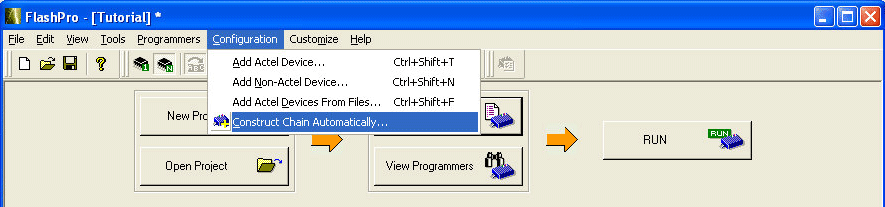
- A popup appears asking you to select the
programmer you would like to use from the ones attached to your computer. Choose the
appropriate programmer (as shown in the figure below) and click OK.
Figure 9-49. Select Programmer Popup 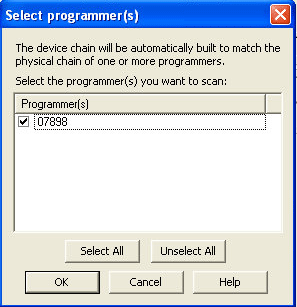
Automatic chain construction starts. The Log window documents the detection and verification of all devices in your chain. The devices are added to the chain in the Chain Configuration window; see figure below for an example.
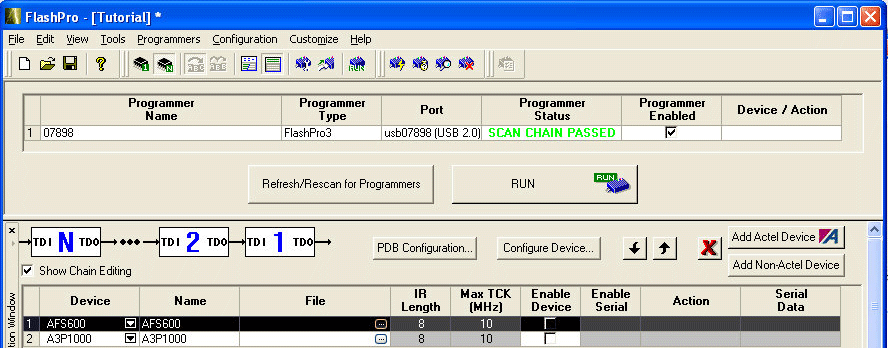
In some cases, FlashPro is not able to uniquely identify the device due to shared IDCODEs, and lists all possible devices (ex: AGL030V2/AGL030V5). Once a programming file is loaded for that device, the device field only shows one device, since the programming file will only be targeted to one device.