
13.29.16 Back-Annotation
The back-annotation functions are used to extract timing delays from your post layout data. These extracted delays are put into a file to be used by your CAE package’s timing simulator. If you wish to perform pre-layout back-annotation, select Export and Timing Files from the File menu.
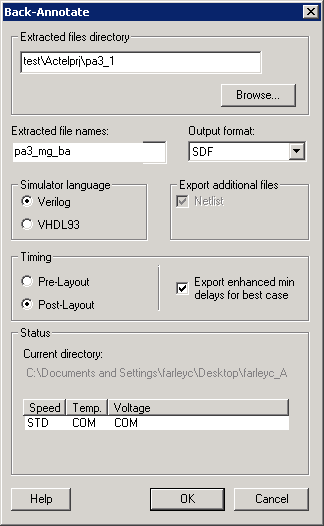
The Back-Annotation command creates the files necessary for back-annotation to the CAE file output type that you choose. Refer to Actel interface guides or the documentation included with your simulation tool for information about selecting the correct CAE output format and using the back-annotation files.
To back-annotate your design:
- From the Tools menu, choose Back-Annotate.
- Make your selections in the Back-Annotate dialog box and click OK.
Extracted Files Directory: The file directory is your default working directory. If you wish to save the file elsewhere, click Browse and specify a different directory.
Extracted File Names: This name is used as the base-name of all files written out for back-annotation. Do not use directory names or file extensions in this field. The file extensions will be assigned based on your selection of which file formats to export. The default value of this field is <design>_ba. The Extracted File Names field is disabled when you open Designer from the Libero IDE. If you wish to change your extracted file name, you must change the name of your file (Save As) and save it outside of the Libero IDE folder structure.
Output Formats: Select the file format of the timing file, SDF or STF. (STF is only supported for DX, MX, and SX).
Simulator Language: Select either Verilog or VHDL93.
Export Additional Files: Check Netlist or Pin to export these files at the same time. For Fusion, IGLOO, ProASIC3, and Axcelerator familes, you must export and use the "flattened" netlist (AFL-style) with the back-annotated timing file (SDF) in timing simulation.
Timing - Pre-Layout or Post-Layout sets whether you want to export your pre- or post-layout timing files for back-annotation. You can use pre-layout to backannotate your netlist before place-and-route, but it is less precise than post-layout timing. Post-layout is more precise because it contains your actual design implementation.
Export enhanced min delays for best case - This option changes the best-case number in the SDF file. By default, best case numbers are derived from typical operating conditions. If you enable this option, best case numbers also reflect minimum delay, including variations in process and die.
You must export the netlist from the back-annotate command for IGLOO, ProASIC3, SmartFusion, Fusion, and Axcelerator. This selection is hard-coded to be ON. For all other families, the export-netlist and back-annotate actions generate equivalent netlist files, so the back-annotate command does not enforce the writing out of the netlist during back-annotate.