
9.4.5.3 Modify Embedded Flash Memory Block Content
Now, you can to modify the Embedded Flash Memory Block content.
To modify Embedded Flash Memory Block content:
- Click the PDB Configuration button to open FlashPoint.
Figure 9-39. Program File Generator 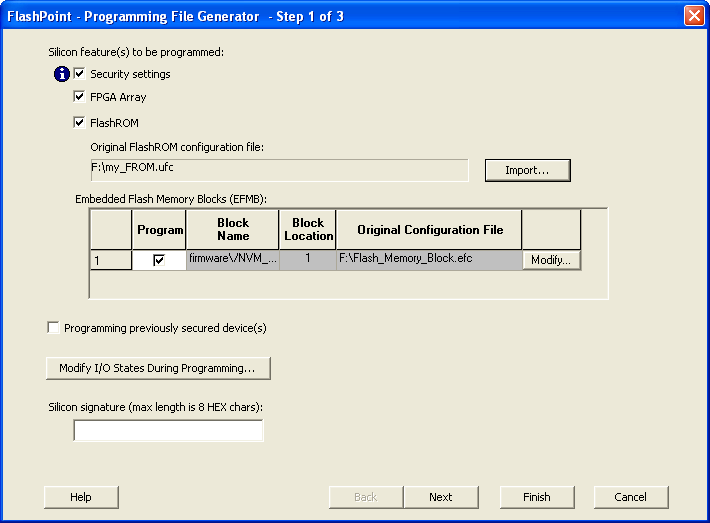
- Check the Program box.
- Click the Modify
button to import Embedded Flash Memory Block configuration and memory content file. The
Modify Embedded Flash Memory Block dialog box appears.
Figure 9-40. Modify Embedded Flash Memory Block Content Dialog Box 
- Click the Import Configuration File button to import the Embedded Flash Memory Block configuration and memory content from the EFC file. This will populate the client table below. All clients that belong to this block will be selected by default.
- Click the Import content button if you want to change the client memory content.
- Click OK.
- Click Finish.
Figure 9-41. Audit Warning 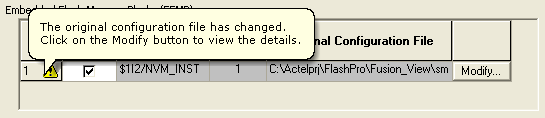
Note: FlashPoint audits the original configuration and memory‑content files and displays a
warning if the files cannot be located or if they have been modified. These files are not
required, because the most recently updated configuration and memory content are stored in the
PDB.
After modifying the Embedded Flash Memory Block content, proceed to program the device. For step‑by‑step instructions, see the Programming a Device section in the Single STAPL/PDB File Basic Tutorial..