
9.4.1.1 Loading and Configuring a Programming File
After creating a project and connecting the programmer, you are ready to load a PDB or STAPL programming file.
To load a programming file:
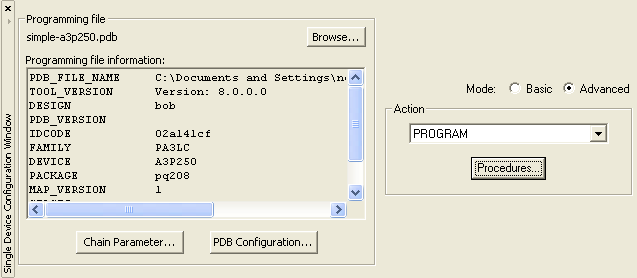
- Click the Configure Device button. The Single Device Configuration window appears.
- Click the Browse button to locate the programming file.
- In the Load Programming File dialog box, select the programming file and click Open.
The Single Device Configuration window updates to display the programming file information and the list of available actions. Program is the default action shown in the Action list.
Note: The default configuration settings are recommended.
This tutorial gives instructions on how to program a device. For an explanation on the other actions available, see Programming File Actions.