9.7.4 Editing the Chain Configuration Grid
The Chain Configuration grid enables you to select an action for your device, enable serialization, and edit the grid using the right-click menu.
To select an Action from the Configuration Grid:
- Choose the device you would like to program and check the Enable Device checkbox.
- In the Action column, click the down arrow to expose the drop down menu.
- Select your desired action.
Figure 9-105. Drop Down Menu for Select Action 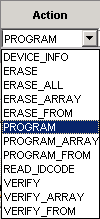
Before you can enable serialization, you must check the Enable Device checkbox.
To enable Serialization:
- Check the Enable Serial checkbox. By enabling serialization, the action options change.
- In the Action
column, click the down arrow to expose the drop down menu.
Figure 9-106. Drop Down Menu for Select Action 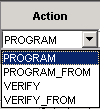
- Select your desired action.
Figure 9-107. Serial Data Column 
- Click Select from the Serial Data column, which is next to the Action column. The Serial Settings dialog box displays.
- Choose your serial settings from the Serial Settings dialog box. For more information, see the Serial Settings section.
Note: : To disable serialization, clear the Enable Serial checkbox
To edit the Chain Configuration Grid:
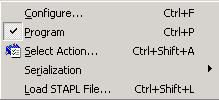
- Select the device you would like to edit and right click anywhere in the row of the selected device.
- Select and click an option from the right-click menu.
Note: The Device Configuration menu includes options for configuring your
device.