9.22.5 Embedded Flash Memory: Browse Retrieved Data
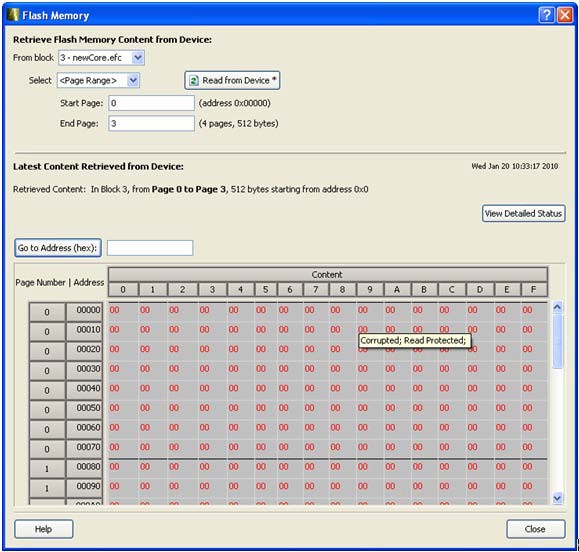
The retrieved data table displays the content of the selected client or the page range selection.
Corrupted pages content is displayed in red. Read-only page content, corresponding to clients
defined with the Prevent read option in Flash Memory System Builder, is displayed on gray
background. If content cannot be read (e.g. pages are read-protected, but security has been
erased), it is displayed as XX. The mouse tooltip summarizes abnormal content status.Figure 9-149. Flash Memory Details Dialog Box (Device Debug)
The corresponding page number and address (relative to the current block) are displayed in the left column. The client size specified in the Flash Memory System Builder is shown at the top of the content table.
In the Retrieved Data View you can enter an Address value (such as 0010) in the Go to Address field and click the corresponding button to go directly to that address.
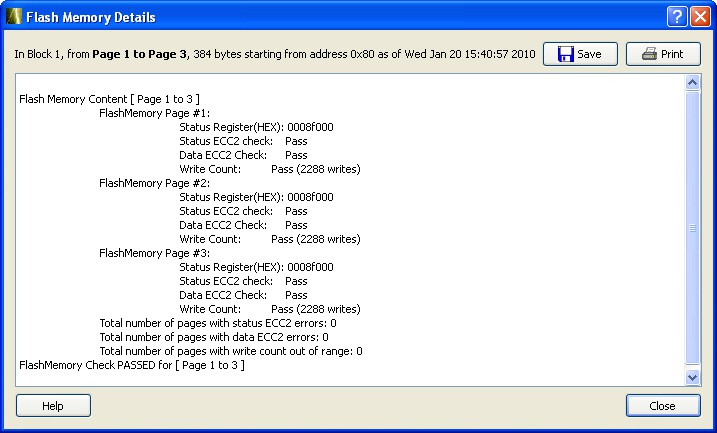
Click View Detailed Status for a detailed report on the page range you have selected.
For example, if you want to view a report on pages 1-3, set the Start Page
to 1, End Page to 3 and click Read from
Device, then click View Detailed Status; the following
figure is an example of the data for a specific page range.Figure 9-150. Flash Memory Browse Retrieved Data