The FlashPro® software also enables you to customize the programmer window
by right-clicking on the programmer window's header.Figure 9-155. Programming Window Header
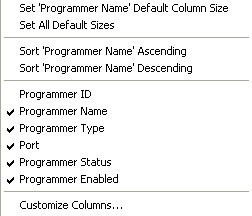
The following figure illustrates the right-click menu.Figure 9-156. Right-click Menu
The Customize right-click menu (as shown above) is divided into three sections. Click an item in
the first section to set default sizes. Click an item in the second/middle section to add that
item to the programmer window, and click the Advanced or last section
to customize the columns in the Programmer window from the
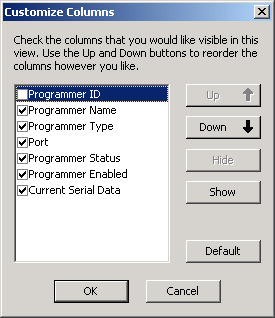
Customize Columns dialog box.Figure 9-157. Customize Columns Dialog Box
Note: Follow the instructions in the Customize Columns dialog box to
customize the programming window. Use the Up and Down buttons to move through the list. Use
the Show and Hide buttons to hide or show columns in the programmer window.