
9.22.1 Inspect Device Dialog Box
Inspect Device is available as a part of the FlashPro® programming tool. Refer to Using Device Debug for information on how to configure the FlashPro to get access to this feature.
The Inspect Device dialog box enables you to access all the Device Debug features, such as the FlashROM, Embedded Flash Memory (NVM) and Analog Block. If you have multiple devices and programmers connected, choose your target device/programmer from the dropdown menu and use the ID code to verify that you are inspecting the correct device.
- View Device Status
- Displays the Device Status Report. The Device Status Report is a complete summary of your device state, analog block test values, user information, factory data and security information. Use this dialog box to save or print your information for future reference.
- View Analog Block Configuration
- Opens the Analog Block Configuration dialog box. Enables you to view the channel configuration for your analog block and compare the channel configuration with any other analog block file.
- View Flash Memory Content
- Opens the Flash Memory dialog box. This dialog box enables you to view the details for each flash memory block in your device.
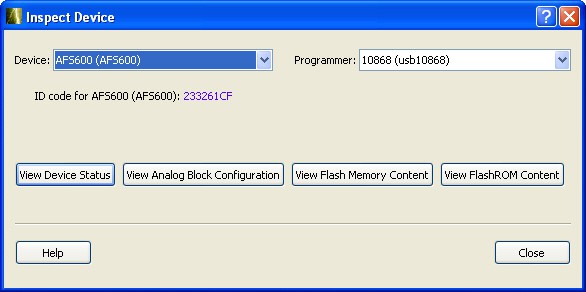
- View FlashROM Content
- The FlashROM data dialog box enables you to view a list of the physical blocks in your FlashROM and the client partitions in FlashROM configuration files.