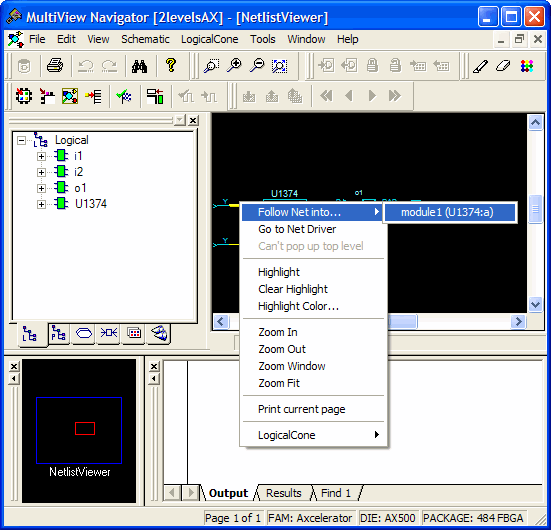
Following a net might take you to another page or another level in your design. Following nets is useful when your design is split into several pages or if it includes some hierarchical logic. Nets that continue on other pages are terminated by a page connector symbol (>). Note that a net can continue on many pages.
Indicates the net ends on another page
Indicates the net begins on another page
The illustrations below show two pages that include the pin labeled "data_6." On both pages, the
net ends with the page connector symbol (>), indicating the net continues on another
page. (Nets can continue on many pages.)Figure 15-19. Symbols for a Continuing Net
Nets that cross a hierarchical boundary are inside a hierarchical instance and connected to a port of the instance or those connected to a pin of a hierarchical instance.
To follow a net:
Select a net in NetlistViewer.
From either the Schematic
menu or right-click menu, choose Follow Net
Into. NetlistViewer displays a list of all pages or modules to which
your net is connected. Choose one item in the list. If the item you chose is a page,
NetlistViewer displays the corresponding page and centers to the page connector (the
-> or >- symbol ending a split net) ending the selected net. If you chose a
module, NetlistViewer does the corresponding Push or Pop operation to display it,
and selects the net connected to the one initially selected.Figure 15-20. Page and Module Option