21.9.4 Deactivating a Specific Inter-Clock Domain
To deactivate the inter-clock domain checking for the specific clock domains clk2->clk1,
without disabling this option for the other clock domains:
- From the Tools menu, choose to open the Constraints Editor View.
- In the Constraints Browser, double-click False Path under Exceptions. The Set False Path Constraint dialog box appears.
- Click the Browse button to the right of the From text box. The Select Source Pins for False Path Constraint dialog box appears.
- For Specify pins, select by keyword and wildcard.
- For Pin Type, select Registers by clock names from the Pin Type drop-down list.
- Type the inter-clock domain name, for example Clk2 in the filter box and click Filter.
- Click OK to begin filtering the pins by your criteria. In this example, [get_clocks {Clk2}] appears in the From text box in the Set False Path Constraint dialog box.
- Repeat steps 3 to 7 for the To option in the Set False Path Constraint dialog box, and type Clk2 in the filter box.
- Click OK to validate the new false path and display it in the Paths List of the Constraints Editor.
- Click the Recalculate All icon
 in the
toolbar.
in the
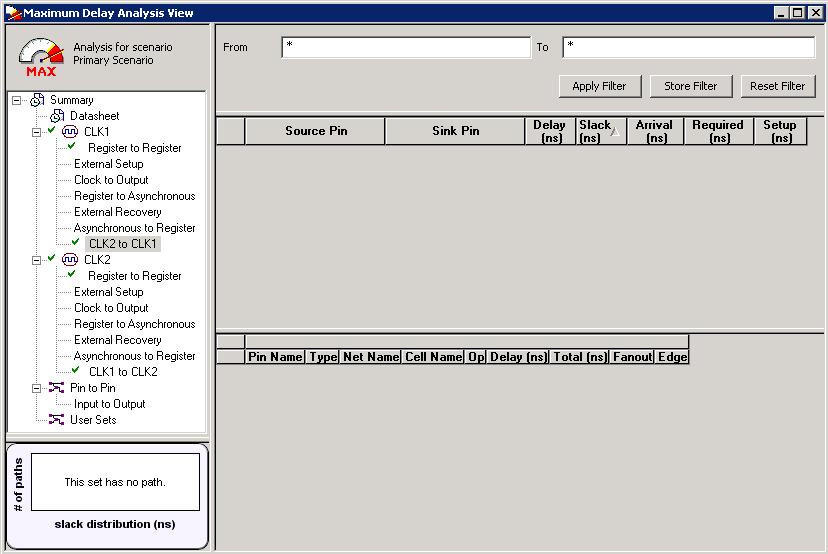
toolbar. - Select the inter-clock domain set clk2 -> clk1 in the Domain Browser (as shown in the following figure).
- Verify that the set does not contain any paths.