10.4.8 Synchronous FIFO for IGLOO®, ProASIC® 3, SmartFusion® and Fusion®
The software automatically cascades FIFO blocks to create wider memories by choosing the most efficient aspect ratio. It also handles the grounding of unused bits.
Related Topics
- Synchronous FIFO for IGLOO®,ProASIC® 3, SmartFusion® and Fusion Functionality
- Synchronous FIFO for IGLOO®, ProASIC® 3, SmartFusion® and Fusion Description
- Synchronous FIFO for IGLOO®, ProASIC® 3, SmartFusion® and Fusion Implementation Rules/Timing Diagrams
- Almost Empty Value/Units
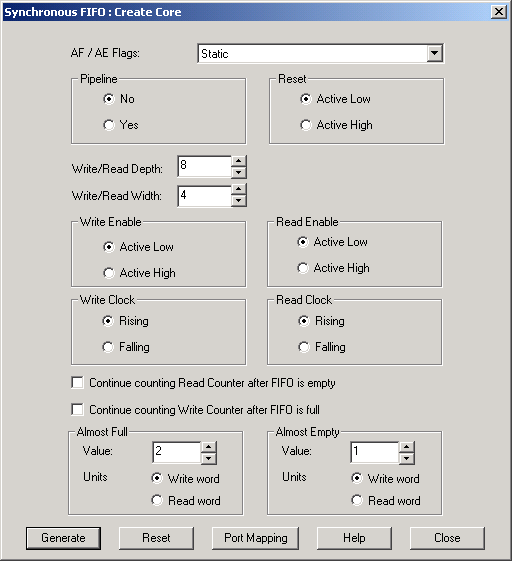
In order to successfully create a FIFO, you must specify the parameters listed in this section.
- Almost Full/Empty Flags
- Choose from Static, Dynamic and No flags. If you choose No flags, the software grounds AFVAL, AEVAL and AFULL, and AEMPTY signals do not appear as ports on the top level. If you choose Static Flags the software configures the AFVAL and AEVAL accordingly. For Dynamic Flags you can drive the AFVAL and AEVAL through a signal and can change the thresholds dynamically. However, care must be taken that the functionality of the AFVAL and AEVAL is fully understood. For more information on these signals please refer to the section on Using FIFO Flags.
- Pipeline
- You can choose to have a pipelined or non-pipelined read. The software configures the PIPE signal accordingly. This is a static selection and cannot be changed dynamically by driving it with a signal.
- Write/Read Depth
- The core configurator supports the generation of FIFO having a write or read depth between 1 and 4096.
- Write/Read Width
- The core configurator supports the generation of RAM having a write or read width between 1 and 576.
- Read and Write Clock Polarities
- The core configurator instantiates inverters as necessary to achieve the requested polarity.
- Read and Write Enable Polarities
- The core configurator instantiates inverters as necessary to achieve the requested polarity.
- Continue Counting Read Counter After FIFO is Empty (ESTOP)
- Selecting this option means the software configures the FIFO in such a way that ESTOP is tied low and counter keeps counting even after FIFO is empty.
- Continue Counting Write Counter After FIFO is Full (FSTOP)
- Selecting this option means the software configures the FIFO in such a way that FSTOP is tied low and counter keeps counting even after FIFO is full.
- Almost Full Value/Units
- This choice is applicable only in the Static Almost Full/Empty selection.
- Almost Empty Value/Units
- This choice is applicable only in the Static Almost Full/Empty selection.
For more information on these choices please refer to the FIFO Flags Usage section.