
20.2.23 Auditing Files
SmartPower checks the time stamps of the VCD file and reports any missing or out-of-date files.
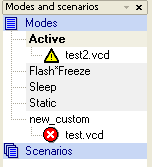
Audit is performed automatically when SmartPower is launched. You can trigger file audit at any time from the Simulation menu, by choosing Audit Files. An icon displaying the file status appears in the Modes and Scenarios toolbar next to the VCD file. Mouse over the icon to obtain more information.
Icon | Description |
|---|---|
Indicates that the VCD file has been modified | |
| Indicates that the VCD file is missing |

To re-import the VCD file, right-click the VCD file and select Re-import VCD File, this will open the Import VCD Options dialog box.