
20.2.5 Probabilities Tab
You can use the Probabilities tab to control the probabilities for all pins.
Bidirectional and Tristate I/Os: Controls the output probability of each tristate and bidirectional I/O. The probability is the percent of time that the I/O is used as an output. You can change the default value and set a specific value for each bidirectional or tristate I/O.
Memories: Controls the read cycle probability or the write cycle probability of a memory block. The probability is the percent of time that a memory block will be used either in a read cycle or a write cycle. You can change the default value as well as set a specific value for each enable pin of each memory block available in the design.
If an enable pin is active low, assign it a probability of 0% to completely enable the I/O or the memory block, or 100% to disable it completely.
In designs with a cascaded memory, all memory enable pins are shown in the Probabilities tab. To simulate real-world power consumption, selectively enable only some memory enable pins, as specified in the memory cascading structure. For purely vertical cascading, enable the pins belonging to one RAM block. For purely horizontal cascading, enable all pins belonging to all RAM blocks of the cascaded memory. You can find which RAM block corresponds to which pin by cross-probing with the MVN NetlistViewer.
Power consumption values predicted by SmartPower may be overestimated for Axcelerator and RTAX-S/SL devices. Axcelerator and RTAX-S/SL devices have automatic depth cascading, which is not accounted for in the current version of SmartPower. A more accurate value for memory power consumption may be achieved by dividing the probability by the level of depth cascading. To simulate a 2048x9 RAM and a cascading level of 2048/512 = 4 with a probability of 40%, enter 40/4 = 10%. Similarly, to simulate a 1024x9 RAM with a 100% probability, enter a probability of 50%.
SmartPower does not support custom probabilities for asynchronous RAMs and FIFOs for ProASIC PLUS® devices.
The Probabilities tab displays the drivers, nets, types, polarity, rates, and source for each pin.
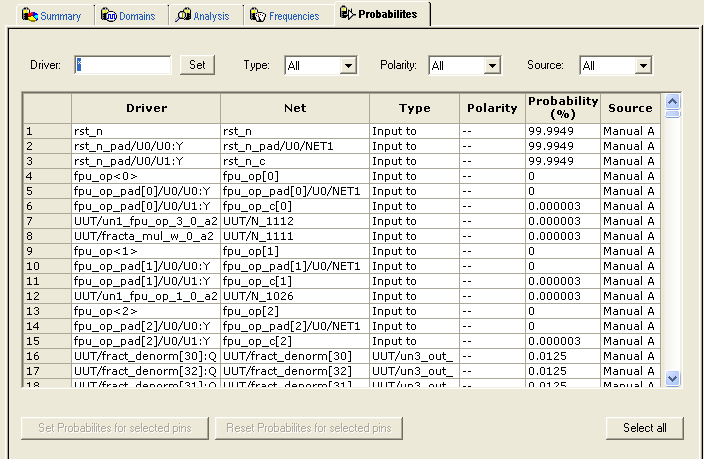
The Driver box enables you to filter the list of drivers based on the criteria entered. Enter text in the filter box, and click Set to apply this text as a filter. Use the * character as a wildcard.
Use the Type drop-down list to filter the pin list by different type (All, All enable, CLKIN, Default, or Input to Output).
Use the Polarity drop-down list to filter the pin list by polarity (Low, High, or All).
Use the Source drop-down list to filter the pin list by source (All, Default Estimation, Manual Annotation, Saif Import, or VCD Import).
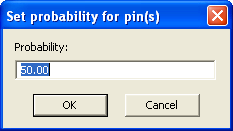
Use Reset Probabilities for selected pins to revert to the default polarity.
You can change the default probability from the Domains tab. To select all the drivers, click Select All.
You can set or reset the probabilities, set a default probability, copy, export, or print the grid by selecting one or multiple pins and choosing an option from the right-click menu.