
20.2.6 Preferences Toolbar
The SmartPower Preferences toolbar gives you quick access to commonly used settings. Mouse over the toolbar button to view a description of the command. Use the drop-down list to select your settings.
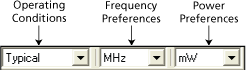
Operating Conditions: Enables you to set the operating conditions - Best, Typical, or Worst.
The actual voltage and temperature of a given operating condition is defined by the operating condition range selected for the current design (COM, IND, MIL, Auto, TGrade1, TGrade2, and Custom). For SmartPower, unlike SmartTime, the worst voltage is the upper bound of the range. That is, higher (worst-case) power comes from higher voltage, whereas higher voltage results in best-case speed.
Worst-case and best-case calculations are available only for certain families and devices.
Frequency: Sets unit preferences for frequency – Hz, KHz, MHz.
Power Units: Sets unit preferences for power – W, mW, or uW.