
20.2.9 Power - Settings Summary
The Power - Settings Summary dialog box displays a summary of the power settings for the current design.
To open the Power - Settings Summary dialog box, from the File menu, select Settings Summary or click the  icon in the SmartPower toolbar.
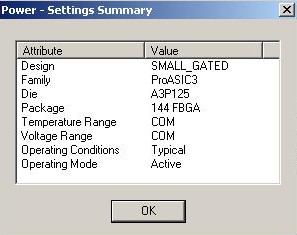
The Power - Settings Summary dialog box displays the following information:
- Design: Displays the name of the design.
- Family: Displays the device family used in the design.
- Die: Displays the die.
- Package: Displays the package.
- Temperature Range: Displays the temperature range.
- Voltage Range: Displays the core supply voltage.
- Operating Condition: Displays the operating conditions that SmartPower uses to calculate static and dynamic power contributions.
- Operating Mode: Displays the operating mode that SmartPower uses to calculate static and dynamic power contributions.
The status bar also shows the ambient temperature, VCCA and speed grade.