20.2.11 Power Options
Enables you to set options that affect the graphical and textual reports. To open the SmartPower Power Options dialog box:
- From the File menu, select Options.
- Select the Options panel in the Power Report dialog box.
- Click the
 icon in the SmartPower toolbar.
Figure 20-21. SmartPower Preferences Dialog Box 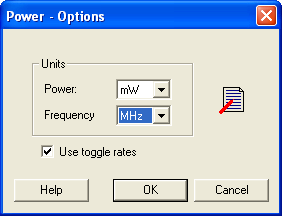
There are two sections: Units and Use Toggle Rates.
- Units: Sets unit preferences for power (W, mW, W) and frequency (Hz, KHz, MHz).
- Use Toggle Rates: When toggle rates are active (Use Toggle Rates box is checked), the data frequency of all the clock domains is defined as a function of the clock frequency. This updates the data frequency automatically when you update the clock frequency. Toggle rates enable you to specify the data frequency as a percentage of clock frequency, but you can no longer specify the data frequency as a number, only as a percentage of the clock frequency. To specify data frequencies, clear the Use Toggle Rates option in the Preferences window.