1.2.24 Analog System Builder and Flash Memory Block Basic Configuration
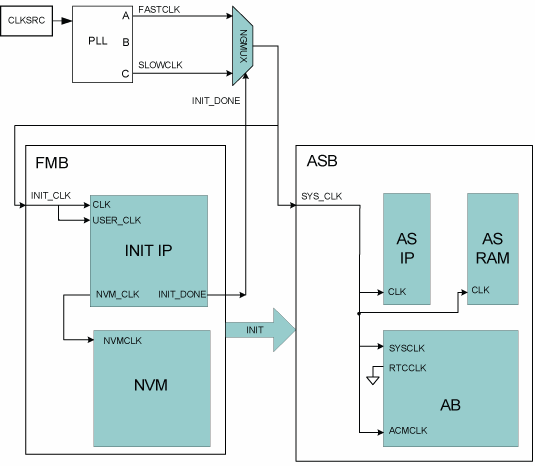
The following diagram illustrates the recommended system configuration when using the Analog System Builder and Flash Memory Block (FMB). The ASB and FMB displayed below are the default exported systems when using basic ASB features and using FMB with an Analog client only.
You can use a PLL to create the two clock frequencies necessary (FASTCLK and SLOWCLK), the GLA and GLC of this PLL must then be fed into a NGMUX for clock switching. During initialization, the SLOWCLK is used to drive both FMB and ASB subsystems, and after initialization the clock switches to the faster clock (as displayed in the following figure).
This clock switching is required because of the silicon requirement on the ACM interface. However, once the initialization of the ACM is complete, the ACMCLK can be driven with the faster clock. The library model issues warnings indicating that this clock is being driven faster than 10 Mhz but these warnings can be ignored after the initialization phase, as long as the ACM will not be accessed while being clocked greater than 10 MHz.
If these warnings are unwanted the ACMCLK can be tied directly to the SLOWCLK. To export the ACMCLK, open the Analog System Builder Advanced Options dialog box and export the ACM clock.
If you export the ACM clock, the system exports an ACMCLK port for the Analog System. GLC on the PLL can then be directly connected to the ACMCLK. This eliminates the simulation warning messages.
The INIT_DONE from the FMB is used for the selection of the NGMUX.
In the following diagrams, “AS IP” and “AS RAM” consist of the Analog System Soft IP modules and their associated RAM blocks.