
1.2.7 ASB Advanced Options
The Advanced Options in the Analog System Builder (ASB) enable you to set the external reference voltage and generate custom system configurations (as shown in the figure below). Some custom configurations (such as ADC only, and IP cores for ADC sequence control only) disable some of the functionality in the Analog System.
See the Analog Block Pin Description in the Fusion Datasheet for more information on these ports.
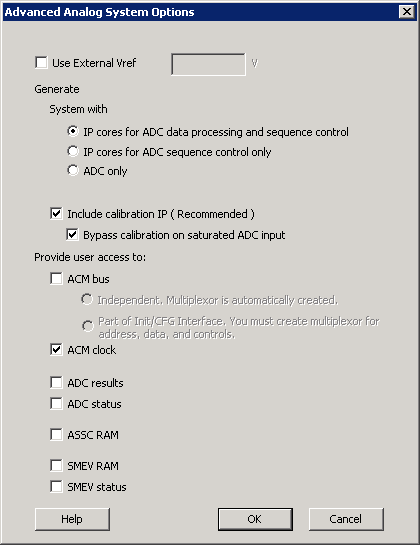
Setting your External VREF (external voltage) enables you to use a specific Analog to Digital Converter (ADC) reference voltage, allowing more accurate ADC conversions.
This VREF value specifies the voltage reference driven into the VREF interface of the analog block. If you do not enter a value then ASB uses an internal VREF of 2.56V; applying an external VREF affects the threshold computations.
This implies that when modifying the External VREF, the legal range of thresholds for current and voltage may be altered.
Note:
Therefore, it is possible that you could create a current or voltage peripheral, set up some flags with threshold values, and then decide to use and change the external VREF. This could lead to errors in the existing flag thresholds.
If you invalidate your flag thresholds by setting an external VREF, the ASB main window displays an icon notifying you of errors in the configured peripheral.
Enabling calibration changes the internal Analog System connectivity and creates additional output files; please see the ASB - Calibration options for more information on Calibration.
The ASB Advanced Options dialog box enables you to generate the following in your Analog Block:
- IP Cores for ADC data processing and sequence control
- IP Cores for ADC sequence control
- ADC only
Each of these are described in the following sections.