
21.6.6 Viewing Register-to-Register Paths
To view register to register paths, perform the following steps:
- Click the + next to Clock to expand the clock domain in the Domain Browser and display the Register to Register, External Setup, and Clock to output path sets.
- Click Register to
Register to display the register to register paths in the Paths
List. It displays a list of register-to-register paths at the top of the Path
List and detailed timing analysis for the selected path in the Path Details.
Note that all the slack values are positive, indicating that no setup time
violations exist (as shown in the figure).
Figure 21-11. SmartTime Register to Register Paths List 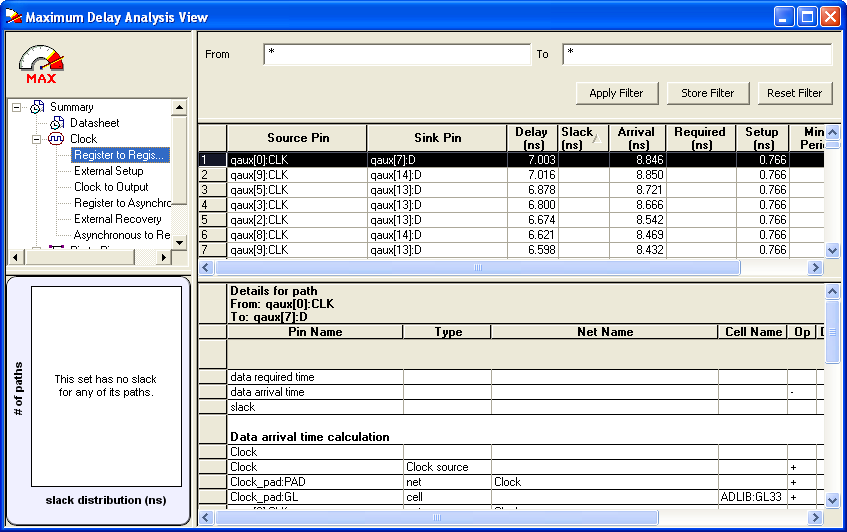
- Double-click a path row to open
the Expanded Path View (see following figure). The top of
the view shows a calculation of the required and arrival times. A schematic of
the path is shown at the bottom of the view.
Figure 21-12. SmartTime Expanded Paths View 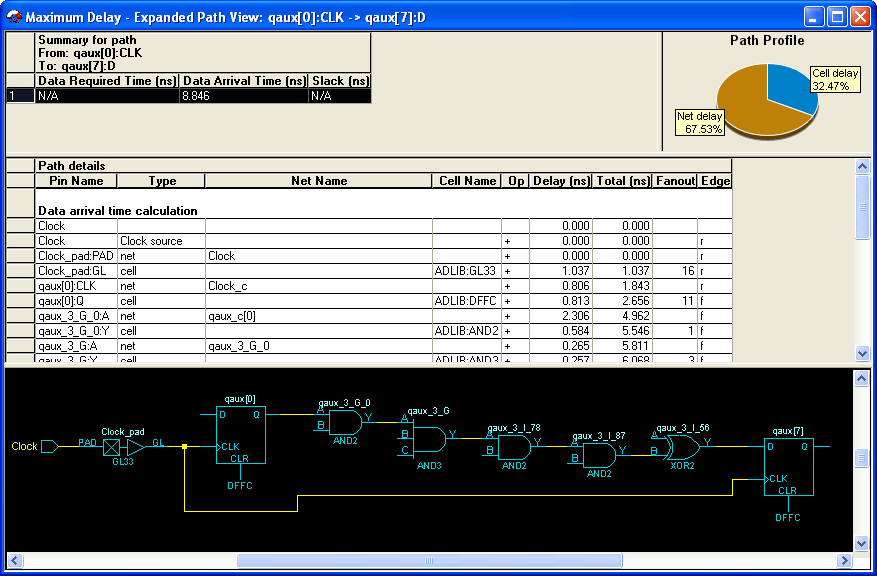
Note: Right-click and drag the mouse to zoom in or out in the
schematic window. Close the Expanded Paths View.