
9.22.18.2 Selecting Serialization Indexes
To select the serialization indexes:
- Check the Serialization checkbox to activate serialization.
- Click the Select Serialization Indexes
button. The Serial Settings dialog box appears.
Figure 9-168. Serial Settings Dialog Box 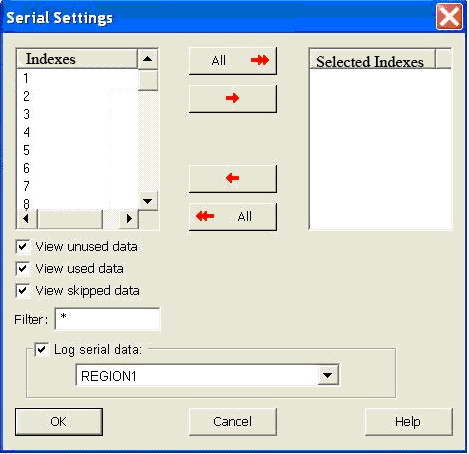
- Click to select an index in the Indexes column.
- Click the red arrow button that is pointing toward the Selected Indexes column to move an index to the Selected Indexes column.
- If you want to move all the Indexes to the Selected Indexes column, click the All button.
- Click OK. Information about your serial indexes displays.
You can move indexes from the Selected Indexes column to the Indexes column by clicking the red arrow buttons pointing toward the Indexes column.
You can set your indexes by choosing the following check boxes: View Unused Data, View Used Data, and View Skipped Data.