
2.2.14.4 Value/Simulation value
This is the actual content that you want programmed into that FlashROM region.
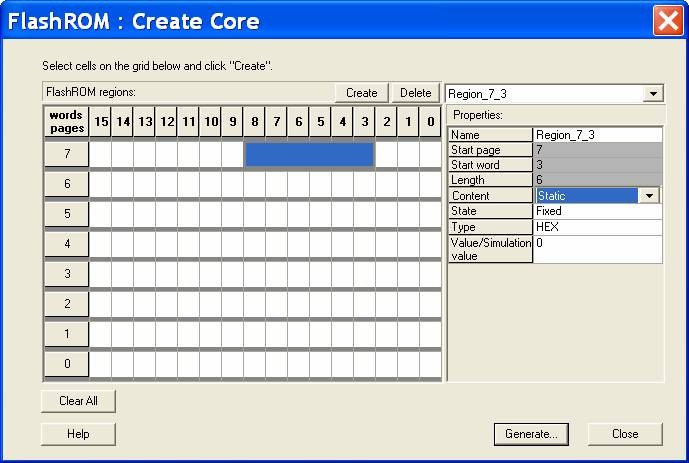
To create a new FlashROM:
- In the Libero IDE Project Manager Core Catalog,
choose Memory & Controllers.
Double-click the FlashROM core in the Core Catalog to start the core generator:
- Click and drag the mouse to select
words, then click the Create button. The core generator displays the new region
properties in the Properties grid.
You may also right-click a word and choose Create from the shortcut menu, or select a word and press the
Insert key on your keyboard. You can copy and paste regions in FlashROM; to do so, right-click a word and choose Copy, then click an empty word, right-click, and choose Paste. If the region is not copied, the page does not have enough room. Try another page with more room.
- Click in the Properties grid to modify a regions properties. Start page, Start word, and Length are read-only. The data you enter is verified and stored in the FlashROM as soon as you leave the Properties grid and select another FlashROM region.
- Click Generate to generate a netlist (output format matches the HDL type you specified when you created your project),GEN, CXF, LOG, UFC, and MEM file. The Generate button opens the Generate Core dialog box. Specify a name and click OK.
- Click and drag the mouse to select
words, then click the Create button. The core generator displays the new region
properties in the Properties grid.
To delete a FlashROM Region:
- Click to select a region in the Regions window.
- Click the Delete button in the core generator, press the Delete key on the keyboard, or right-click and choose Delete from the shortcut menu.
- Click OK.