
21.12.23.3 Sets Pane
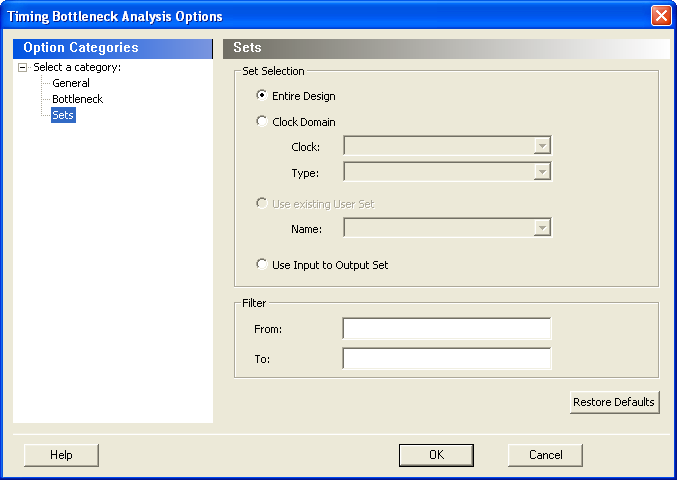
This pane has three mutually exclusive options:
- Entire Design
- Clock Domain
- Use existing user set
- Entire Design: Select this option to display the bottleneck information for the entire design.
- Clock Domain: Select this option to display the bottleneck information for the
selected clock domain. you can specify the following options:
- Clock: Allows pruning based on a given clock domains. Only cells that lie on these violating paths are reported.
- Type: This option can only be
used in conjunction with -clock. The acceptable values are:
Table 21-1. Values for Type Option Value Description Register to Register Paths between registers in the design Asynchronous to Register Paths from asynchronous pins to registers Register to Asynchronous Paths from registers to asynchronous pins External Recovery The set of paths from inputs to asynchronous pins External Removal The set of paths from inputs to asynchronous pins External Setup Paths from input ports to register External Hold Paths from input ports to register Clock to Output Paths from registers to output ports
- Use existing user set: Displays the bottleneck information for the existing user set selected. Only paths that lie within the name set are will be considered towards the bottleneck report.
- Filter: Allows you to filter the bottleneck report by the following options:
- From: Reports only cells that lie on violating paths that start at locations specified by this option.
- To: Reports only cells that lie on violating paths that end at locations specified by this option. Filter defaults to all outputs.